
Picking Up Where We Left Off
In Part 1 of this series, we walked through how Omega Enterprise Gateway (OEG) - a retired .NET application for monitoring industrial sensors - left its authentication middleware completely unwired. The result was that any unauthenticated HTTP client could reset any user's password with a single POST request. Not a great start for software that sits in front of cold storage facilities, regulated labs, and cleanrooms!
Part 1 ended at authentication and Part 2 is where things escalate. With credentials in hand (or bypassed entirely), we kept pulling on threads and following where they went until we ultimately confirmed a path to executing code as NT AUTHORITY\SYSTEM - the Windows service account running OEG. Along the way we found something interesting - a dead code path that should have been an RCE primitive but was silently broken by a developer bug that has sat unexecuted in production.
A Write Primitive With No Guardrails
After establishing access, the first thing we looked at was the firmware upload endpoint - POST /oegservice/UploadFirmware. In principle, this is a legitimate feature: a device administrator uploads a firmware image, OEG stores it, and pushes it to the target hardware. However, the endpoint accepts an arbitrary absolute path in the fileName query parameter with no sanitization:
  POST /oegservice/UploadFirmware?device=0&fileName=C:\\arbitrary\\path\\here&firmwareVer=1.0
  Content-Type: application/octet-stream
  <binary body>
The service writes whatever bytes are in the request body to exactly the path specified. No path canonicalization, no extension filter, no check that the path is inside any expected directory. Additionally - because OEG runs as NT AUTHORITY\SYSTEM in our case, that write happens with full system privileges and we can create or overwrite any file on the filesystem that isn't currently locked by another process.
To put it plainly: the chain we are describing is an unauthenticated - authentication was bypassed in Part 1 - arbitrary write-anywhere-as-SYSTEM primitive. This is one of the most dangerous primitives you can have on a Windows host… the question becomes what you do with it.
Hunting for Restart-Free RCE
The UploadFirmware write primitive is powerful, but the most direct path to code execution (dropping a malicious DLL into the application directory) requires the service to restart before the new DLL is loaded. In a real Red Team or Pentesting engagement, waiting for or forcing a service restart is often acceptable, but we wanted to know whether there was a path to execution without that dependency. So we went back into the decompiled code…
The Scheduled Task Gambit
The UploadFirmware endpoint has no restriction on writing to C:\Windows\System32\Tasks\. That directory is where Windows Task Scheduler stores its task definitions as XML files. The idea here is… write a valid scheduled task XML, properly encoded as UTF-16 LE with BOM to match native schtasks.exe output, and let Task Scheduler pick it up automatically and execute it.
POST /oegservice/UploadFirmware?device=0&fileName=C:\\Windows\\System32\\Tasks\\OmegaGatewayUpdate&firmwareVer=1.0
The file write succeeded… {"result":true} came back from the server. But when we queried the task:
On Windows 11 (our host in this case), Task Scheduler does not automatically register XML files dropped into the task directory. Registration requires going through the COM API. The file sits on disk, invisible to the scheduler.
On Windows 7 and Server 2008 R2, the Task Scheduler service genuinely monitors the C:\Windows\System32\Tasks\ directory with ReadDirectoryChangesW and auto-registers new XML files dropped there - no COM API required. That behavior was widely documented and abused in real-world campaigns for years. At some point in the Windows 10 lifecycle Microsoft tightened the validation path, and by Windows 11 it's fully dead without the COM API. This matters for OEG specifically because OT/ICS environments are notorious for running decade-old operating systems. An OEG deployment on a Windows 7 or Server 2008 R2 box - not at all unlikely in a legacy sensor monitoring context… In other words, this technique would allow for a restart-free RCE chain instead of a dead end!
The Alarm Window - A Side Quest to Dead Code
The more interesting dead end began with decompiling Omega.Infrastructure.Core.dll with ILSpy revealing the following inside device_OnDeviceEventReceived():
  if (omegaBaseEvent.EventType == "Alarm" || omegaBaseEvent.EventType == "Offline")
  {
      // ...write shared memory...
      Process.Start(appDir + "\\\\Omega.Alarm.Window.exe");
  }
That condition checks the EventType property - a virtual method on OmegaBaseEvent. When we cross-reference the implementations across the event class hierarchy, the picture becomes clear:
 class MeasurementAlarmEvent  : OmegaBaseEvent { public override string GetEventType() => "ALARM";   }
 class DeviceStatusUpdateEvent: OmegaBaseEvent { public override string GetEventType() => "STATUS";  }
C# string equality is case-sensitive and therefore Process.Start is unreachable in this way.
In other words… the intent is clear: when EnableLocalAlarmPopup is true and a device fires an alarm or goes offline, the service launches Omega.Alarm.Window.exe from the application directory. Since we control Omega.Alarm.Window.exe via UploadFirmware, this looks like a clean, trigger-on-demand, restart-free RCE primitive… except it never fires.
The developer who wrote the alarm window trigger used "Alarm" and "Offline" - which match the values they set in the Event field elsewhere in the code. But the trigger reads EventType - the virtual method - which returns uppercase enum-style strings. System.String::op_Equality is case-sensitive.
The root cause is a classic property/field confusion: event.Event = "Alarm" writes to one property while event.EventType reads from a completely different virtual dispatch chain. The developer tested the alarm popup on a UI path that probably set the Event field directly. The check in the background service reads a different property. Two properties, two naming conventions, one silently broken feature, zero executions in production.
The Confirmed RCE Chain
The genuine code execution path is less clever but equally effective. DeviceRegistrationHelper is a lazy singleton - its constructor does not run at service startup but instead, it runs the first time any device-related HTTP endpoint is accessed. That constructor scans the registereddevices/ subdirectory for DLL filenames, but there is a detail worth noting in exactly how it loads them:
string exePath = EnvUtil.GetCurrentExePath(); // parent install dir
string[] dlls = Directory.GetFiles(Path.Combine(exePath, "registereddevices"), "*.dll");
foreach (string dll in dlls)
{
    string loadPath = Path.Combine(exePath, Path.GetFileName(dll));
    RegisterDevice(loadPath); // Assembly.LoadFrom(loadPath)
}
The scanner enumerates registereddevices/ for the list of filenames, but Assembly.LoadFrom resolves each one relative to the parent install directory (one level up) because EnvUtil.GetCurrentExePath() returns the directory of Omega.Sensor.dll, which lives there. This means the DLL needs to land in both locations:
- registereddevices\EvilDeviceProvider.dll - so the scanner finds the filename
- C:\Program Files\OMEGA Engineering\OMEGA Enterprise Gateway\EvilDeviceProvider.dll - so Assembly.LoadFrom can actually load it!
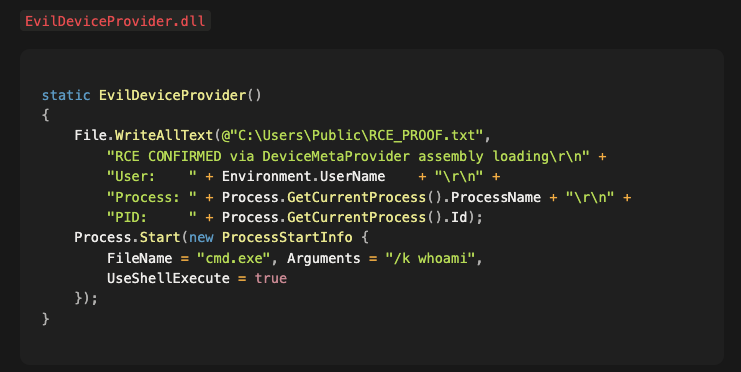
Conveniently, both writes are reachable via /UploadFirmware's unrestricted absolute path write that we opened this blog with. Once loaded, RegisterDevice calls CreateInstance on the first DeviceMetaProvider subclass it finds in the DLL - that instantiation triggers the static constructor immediately. The DLL implements DeviceMetaProvider to satisfy the type check, and its static constructor contains the payload:
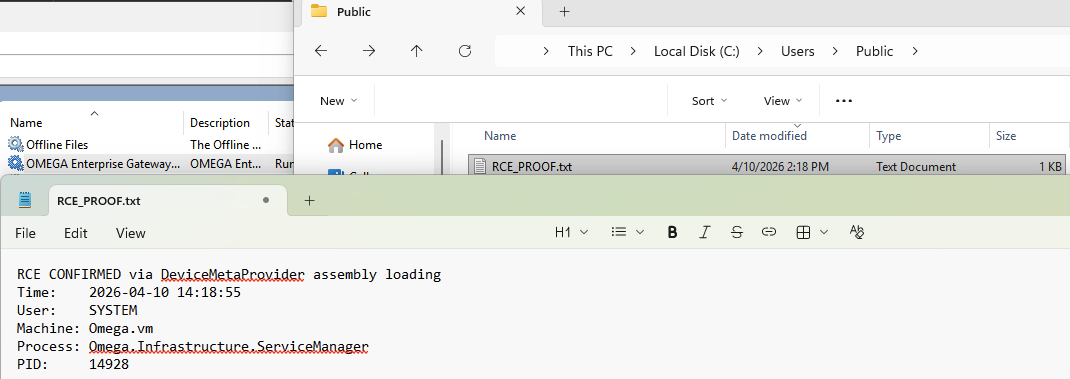
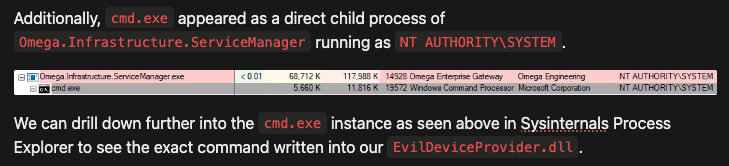
After both files are dropped, a GET /oegservice/GetSupportedDevices request triggers the singleton initialization. The proof file RCE_PROOF.txt confirmed code execution inside the service process!
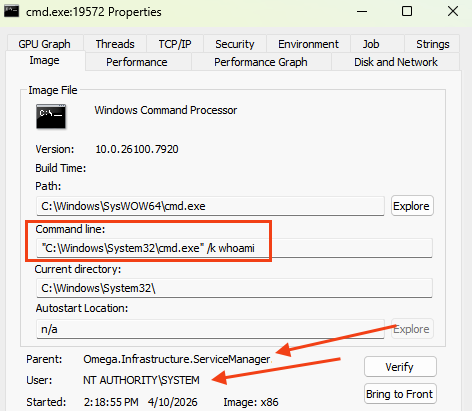
Wrapping Up
The dead code finding is worth pausing on, because it illustrates something we see often… security-relevant features written by developers who understood the threat model but introduced a subtle implementation error that silently neutralized the protection. The alarm window launch looked, from a quick code scan, like a legitimate runtime trigger. It took decompiling all five event subclasses and tracing the virtual dispatch chain to confirm it had never worked. The sub-lesson here is that .NET binary analysis matters "the code is there" is not the same as "the code runs."
Omega Engineering (DwyerOmega as of the time of this blog) has retired OEG, so there will likely be no patches released. If you are running this software in any capacity, the appropriate action is decommission. If decommission is not immediately possible, network isolation (no ingress to port 80/443 or the API ports and endpoints from untrusted segments) removes the attack surface entirely!
Maybe your network has retired applications, maybe it doesn’t - or maybe you aren’t sure! In any event, if you are interested in proactively securing your network assets with continuous penetration testing - give Sprocket a call!