

In our first blog, we released azmap.dev and kept the underlying technique intentionally vague. The backend handled the enumeration without disclosing the endpoint or method.
Microsoft has since fully patched the endpoint we were leveraging. This post covers the original technique, what you can still do to discover domains, and how we’ve updated azmap.dev until a new technique comes along.
Before we dive in, I want you all to know, the API still returns roughly the same data it always did, but the underlying approach is completely different.
The original technique
https://sts.windows.net/{DOMAIN}/metadata/json/1
The original technique is as follows: a single unauthenticated GET request that returns all domains associated with a tenant in the allowedAudiences field at the endpoint above.
By querying Microsoft's own tenant (72f988bf-86f1-41af-91ab-2d7cd011db47) before the patch, you'd get back something like this:
{
  "version": "1.0",
  "realm": "72f988bf-86f1-41af-91ab-2d7cd011db47",
  "name": "sts",
  "allowedAudiences": [
    "00000001-0000-0000-c000-000000000000/accounts.accesscontrol.windows.net@microsoft.com",
    "00000001-0000-0000-c000-000000000000/accounts.accesscontrol.windows.net@xbox.com",
    "00000001-0000-0000-c000-000000000000/accounts.accesscontrol.windows.net@mojang.com",
    "00000001-0000-0000-c000-000000000000/accounts.accesscontrol.windows.net@microsoft.onmicrosoft.com",
    "00000001-0000-0000-c000-000000000000/accounts.accesscontrol.windows.net@72f988bf-86f1-41af-91ab-2d7cd011db47"
  ]
}
Microsoft's tenant clearly has more, but we’ve trimmed it down here. The format is consistent in that everything after the @ is a tenant domain.
curl -s "https://sts.windows.net/72f988bf-86f1-41af-91ab-2d7cd011db47/metadata/json/1" | jq -r '.allowedAudiences'
The endpoint also accepted a tenant ID GUID in the URL path instead of a domain, but you never needed one.
You could just pass the domain and get the full list, and get the tenant ID as one of the domains. On top of that, the allowedAudiences list also contained the tenant’s onmicrosoft.com domain, which gave you the tenant name for free.
That onmicrosoft.com prefix is what tools like onedrive_user_enum need to construct SharePoint and OneDrive URLs (https://TENANTNAME-my.sharepoint.com/personal/). One GET request gave you every domain in the tenant and the onmicrosoft.com prefix for downstream tooling.
What is this endpoint
Azure Access Control Service (ACS) was Microsoft's original token service for federation. It launched as part of Azure's early identity infrastructure and handled WS-Federation trust relationships between identity providers and relying parties. Microsoft officially retired ACS in November 2018 and completed the final retirement of SharePoint Add-In auth using ACS tokens in April 2026.
But "retired" in Microsoft's world doesn't mean "turned off." The accounts.accesscontrol.windows.net hostname is now "handled by a different service" according to their own FAQ, and the infrastructure was absorbed into the Entra ID backend.
The /metadata/json/1 path is ACS plumbing for WS-Federation token validation. The allowedAudiences field lists every verified domain in a tenant so that relying parties know which tokens to accept. It's not a discovery feature; it's a trust configuration artifact, and the data it exposed was a side effect of how WS-Federation trust works rather than an intentional directory.
The final patch
Before /metadata/json/1, the standard technique was a SOAP POST to autodiscover-s.outlook.com/autodiscover/autodiscover.svc requesting GetFederationInformation. Tools like succ, AADInternals, and others built their tenant enumeration around it.
In June 2024, Microsoft announced they were changing how the Autodiscover service responds to federation queries. MC1081538 followed in May 2025 as the rollout approached, and by August the underlying SOAP endpoint was fully neutered. Every tool that relied on it broke. In September 2025, DrAzureAD (Nestori Syynimaa) closed the AADInternals OSINT tool since its core enumeration couldn't work anymore.
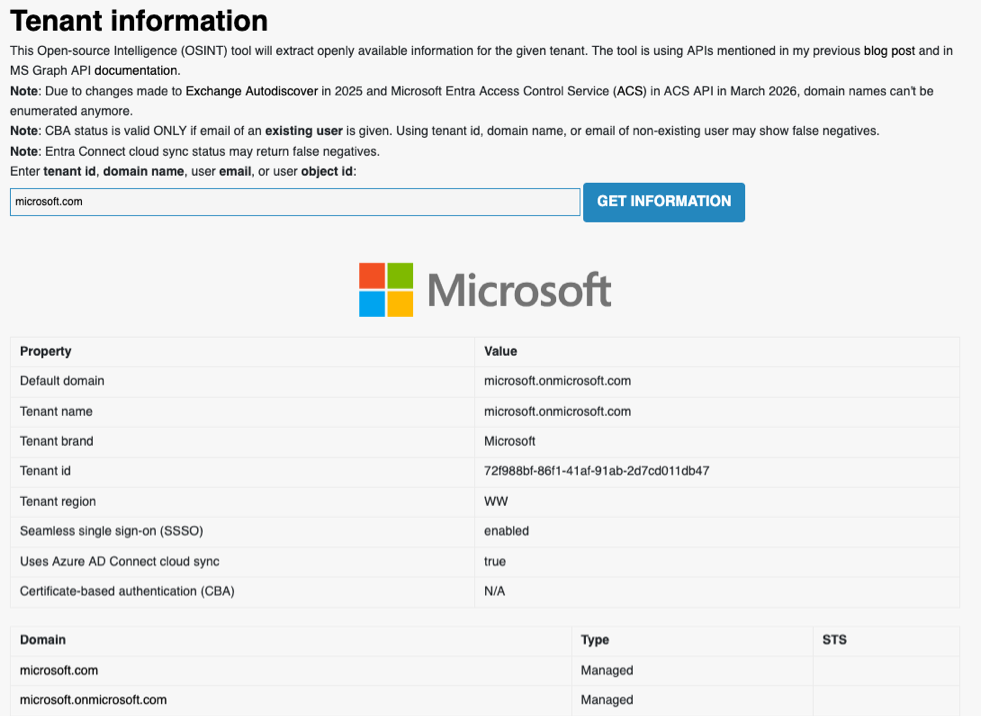
It's back up now as an authenticated tool, with a note that "due to changes made to Exchange Autodiscover in 2025 and Microsoft Entra Access Control Service (ACS) in ACS API in March 2026, domain names can't be enumerated anymore."
The ACS metadata endpoint survived because it was a completely different code path owned by a different team. The Exchange/Autodiscover team patched their endpoint, but metadata/json/1 was never in scope for that fix. We tested over 240 other Microsoft endpoint surfaces looking for alternatives and came up empty. It seems like for now, this was the only unauthenticated path to full tenant domain enumeration that was still alive.
The endpoint itself has been around for some time and utilized by others before us way before the patch. We'd found the ACS metadata endpoint independently and had been using it internally since August 2025. Daniel Bradley (@DanielatOCN) built TenantDomainFinder around the same endpoint, and later wrote about Microsoft patching it . We published Part 1 and released azmap.dev in January 2026.
Dirkjan Mollema (@_dirkjan) had actually demonstrated the ACS endpoint at his Black Hat and DEF CON talks the previous summer, though as he put it, "probably not many people spotted the reference."
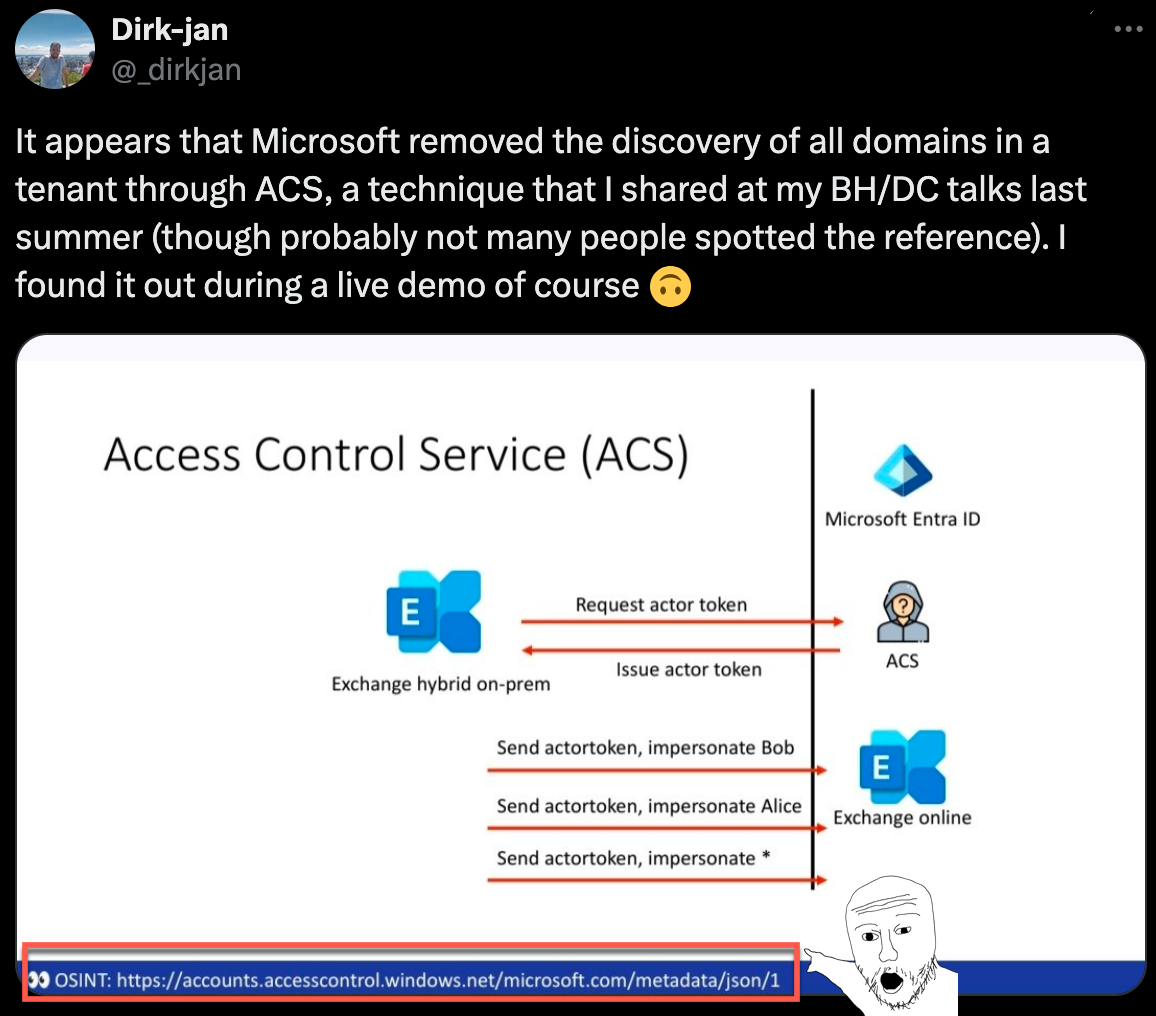
Microsoft eventually patched metadata/json/1 too, but the rollout was actually uneven. The metadata/json/1 path was mirrored across a bunch of Microsoft's identity hostnames, all serving the same data:
- accounts.accesscontrol.windows.net
- login.microsoftonline.com
- login.windows.net
- login.microsoft.com
- login.microsoftonline-p.com
- loginex.microsoftonline.com
- login-us.microsoftonline.com
- sts.windows.net
- {tenantname}.ciamlogin.com
For a brief time, we were able to still leverage this technique across these other deployments that had not yet been patched in a very crude implementation where we’d just target each endpoint multiple times until one hit an unpatched instance in the backend:
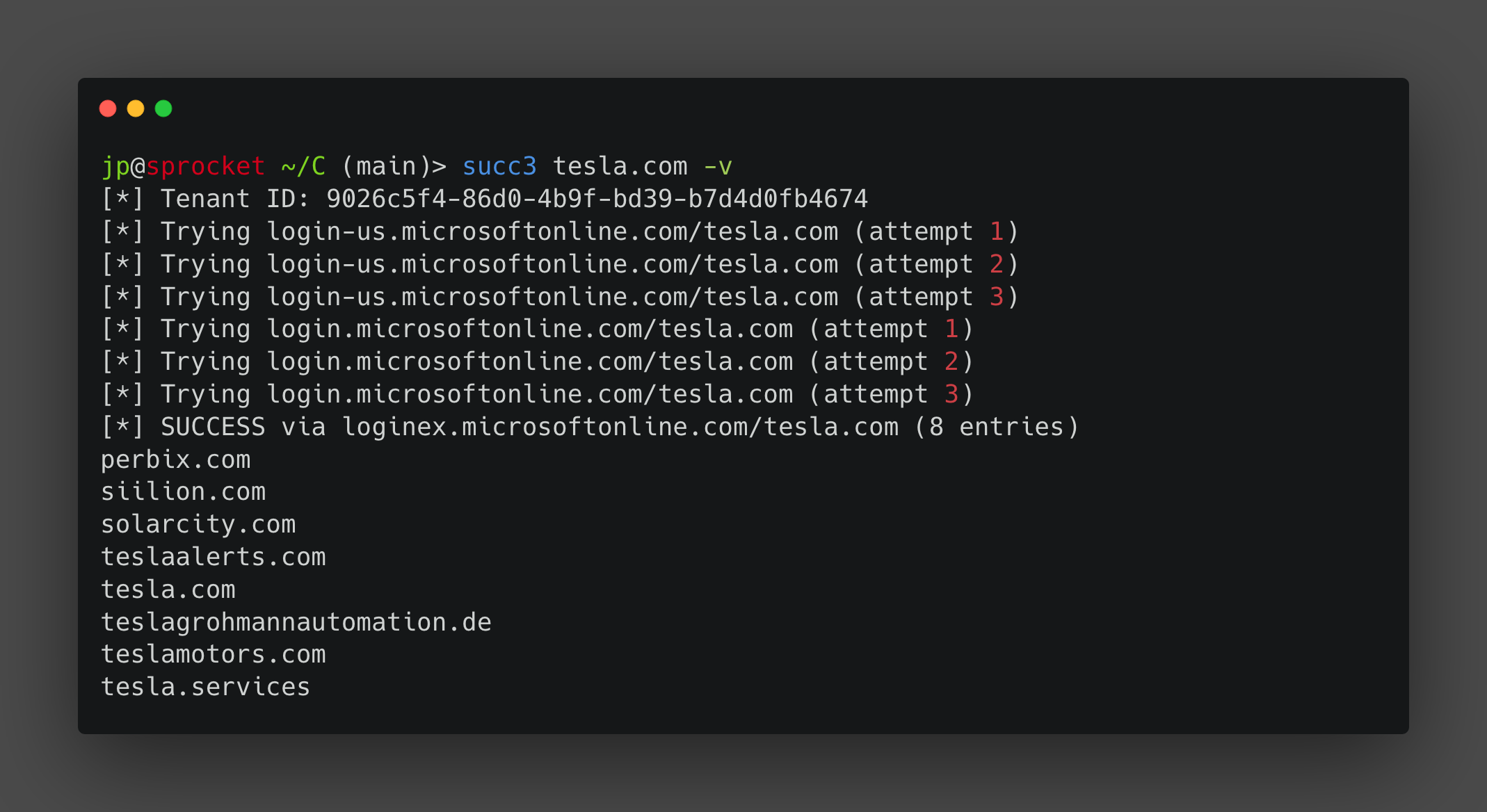
But by May 2026, the endpoint was dead across the board.
What still works
Tenant enumeration is dead. There is no unauthenticated endpoint you can hit with a domain and get back every other domain in that tenant. That's gone, and it's probably not coming back. Microsoft closed the SOAP path, closed the ACS path, and for now, nothing else has been publicly discovered.
But the individual building blocks that made tenant enumeration useful are still alive. You can still resolve a tenant ID from a domain. You can still get the onmicrosoft.com prefix if you know where to look. You can still pull brand names and branding metadata. None of these give you the full domain list on their own, but together they're enough to reconstruct most of what the old endpoints gave you, just not in a single request anymore.
Getting the tenant ID
Tenant ID resolution is a feature not a bug. The OpenID configuration endpoint returns it for any domain:
curl -s "https://login.microsoftonline.com/contoso.com/.well-known/openid-configuration" | jq -r '.issuer' | cut -d'/' -f4
Microsoft's ODC federation provider endpoint (odc.officeapps.live.com/odc/v2.1/federationprovider) also returns the tenant GUID. Both are by design and there's no indication either will change.
Getting the tenant name
The tenant name (the onmicrosoft.com prefix) is the harder problem now. The metadata endpoint used to hand it to you in the allowedAudiences array, and now that it's gone you need another way to get it.
And you do need it. This is different from the organization name or "brand name" that tools like GetUserRealm return. Costco's brand name is "Prod - Costco IAM Users" but the actual Microsoft Online Email Routing Address (”MOERA”) prefix is iamdevcostco. You can't build a URL from a brand name.
The MOERA prefix is what constructs SharePoint and OneDrive URLs for tools like onedrive_user_enum (https://TENANTNAME-my.sharepoint.com/personal/), and it shows up everywhere in offensive M365 work: MDI sensor discovery at TENANTNAME.atp.azure.com, SharePoint site brute-forcing at TENANTNAME.sharepoint.com/sites/, the SharePoint admin center at TENANTNAME-admin.sharepoint.com. Without the prefix, a huge chunk of the follow-on tooling doesn't work.
One thing to understand first: the onmicrosoft.com domain that Microsoft assigns at tenant creation is permanent. Microsoft calls these MOERA domains (Microsoft Online Email Routing Address), and the initial one can never be renamed or removed. Their docs refer to it as the "initial domain." An admin can add additional onmicrosoft.com domains and set one as a "fallback," but the original stays forever. That's what makes it useful.
DKIM CNAME lookup
Now that the metadata endpoint is gone, there's no single request that hands you the onmicrosoft.com prefix anymore. So we need to pull it from somewhere else, and for most targets, the fastest way is a DNS query.
When an organization configures DKIM signing through Exchange Online, Microsoft has them create CNAME records that point to their signing infrastructure, and the CNAME target contains the tenant name. Microsoft provisions two selectors (selector1 and selector2), so we check both:
dig +short selector1._domainkey.tesla.com CNAME
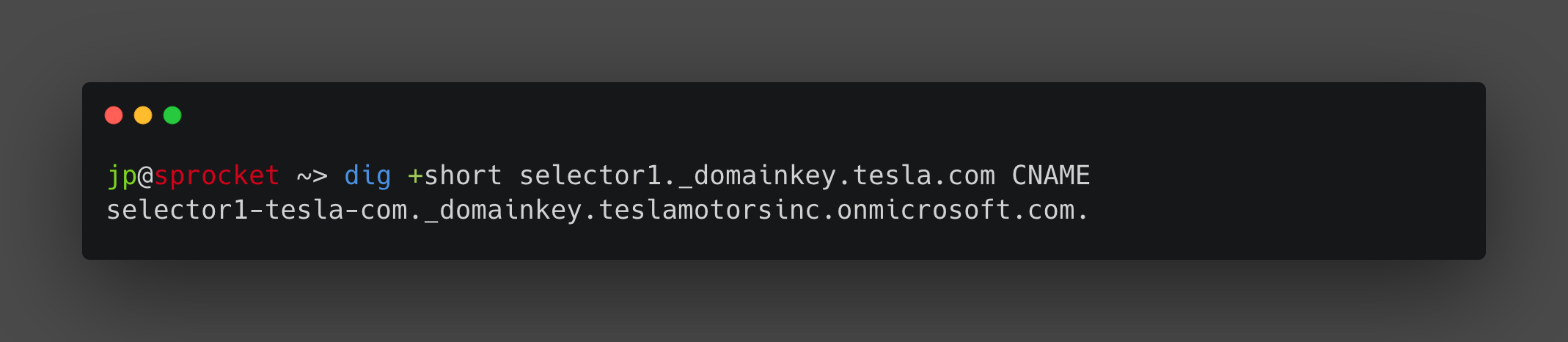
The part between ._domainkey. and .onmicrosoft.com is the prefix. One DNS query, with no authentication, and we get an instant result (most of the time). This is super useful when the target has a tenant name that is not easily guessable.
tesla.com       -> teslamotorsinc.onmicrosoft.com
apple.com       -> appleoffice.onmicrosoft.com
vmware.com      -> onevmw.onmicrosoft.com
target.com      -> targetonline.onmicrosoft.com
Microsoft is also rolling out a new DKIM CNAME format under the .microsoft gTLD as part of their broader domain migration. The tenant name sits in the same position in the CNAME target, just with a different suffix. Both formats coexist right now, and legacy tenants keep their .onmicrosoft.com records until migration.
There's a caveat. Microsoft's DKIM documentation states that DKIM signing for custom domains requires manual admin configuration. The onmicrosoft.com domain gets automatic DKIM signing internally, but the CNAME records we query only exist if an admin explicitly enabled DKIM signing for that custom domain.
Some orgs never bother, and organizations routing mail through third-party gateways (Proofpoint, Mimecast, Barracuda) are even less likely to set it up since the Defender portal blocks DKIM key creation when MX doesn't point to Exchange Online. Out of 20 enterprise targets we tested, roughly half had no DKIM CNAMEs at all.
Dell (dell.com), where DKIM fails entirely:
dig +short selector1._domainkey.dell.com CNAME
# (empty)
dig +short selector2._domainkey.dell.com CNAME
# (empty)
Dell has an M365 tenant (ID: 945c199a-83a2-4e80-9f8c-5a91be5752dd) and dell.onmicrosoft.com exists (confirmed via MX), but there are no DKIM CNAMEs for any custom domain. Dell likely uses a third-party gateway that handles DKIM outside of Exchange Online. We can leverage a different technique tho to get the tenant name.
MX brute-force
When DKIM doesn't have a record, there's a brute-force approach that's faster than it sounds. Every onmicrosoft.com domain has an MX record, and querying one that doesn't exist returns nothing:
dig +short MX teslamotorsinc.onmicrosoft.com
# 0 teslamotorsinc.mail.protection.outlook.com.

dig +short MX thisdoesnotexist123.onmicrosoft.com
# (empty)
So you can validate guesses at about 50ms per query. Generate candidates from the company name (append inc, corp, hq, etc.), check each one against MX, and confirm the match by pulling the OpenID config for the candidate and comparing tenant IDs. For something like Dell where DKIM came up empty, you’d guess ‘dell’, ‘dellinc’, ‘delltechnologies’, ‘dellcorp’ and so on:
dig +short MX dell.onmicrosoft.com
# 0 dell.mail.protection.outlook.com.
Combining DKIM with MX brute-force resolved a decent number of targets during our testing, but it’s not foolproof. Sometimes organizations have tenant names that simply cannot be guessed within a reasonable amount of time.
Microsoft Graph API
Sometimes you'll run into an organization without DKIM configured through Microsoft and a tenant name that can't be easily guessed. Take contoso.com: no DKIM records, and the actual prefix is CONTOSO18839. No wordlist is going to get you there, and brute-forcing that would take a while. For cases like this, you need a different technique.
The Graph API findTenantInformationByDomainName endpoint returns tenant information for any domain and gives you close to guaranteed coverage regardless of DKIM or naming conventions. The only issue is that this is a technique that requires authentication.

Not ideal but not the end of the world. It requires the CrossTenantInformation.ReadBasic.All permission. The site sub2tenant.com (open source at github.com/olhel/sub2tenant-aca) wraps this with pre-authorized credentials.
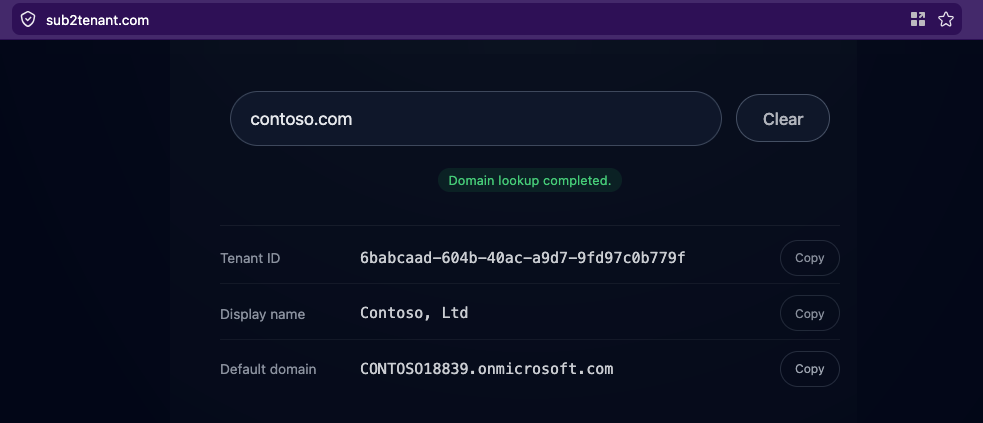
So now we can grab the tenant name for contoso.com: CONTOSO18839. Again, not something we would have been able to guess, or grab using DKIM.
There’s a catch tho. The API returns a field called defaultDomainName, but this is not always the onmicrosoft.com domain. An admin can set any verified custom domain as their default, and for established enterprises that's almost always the vanity domain. BP is a good example:
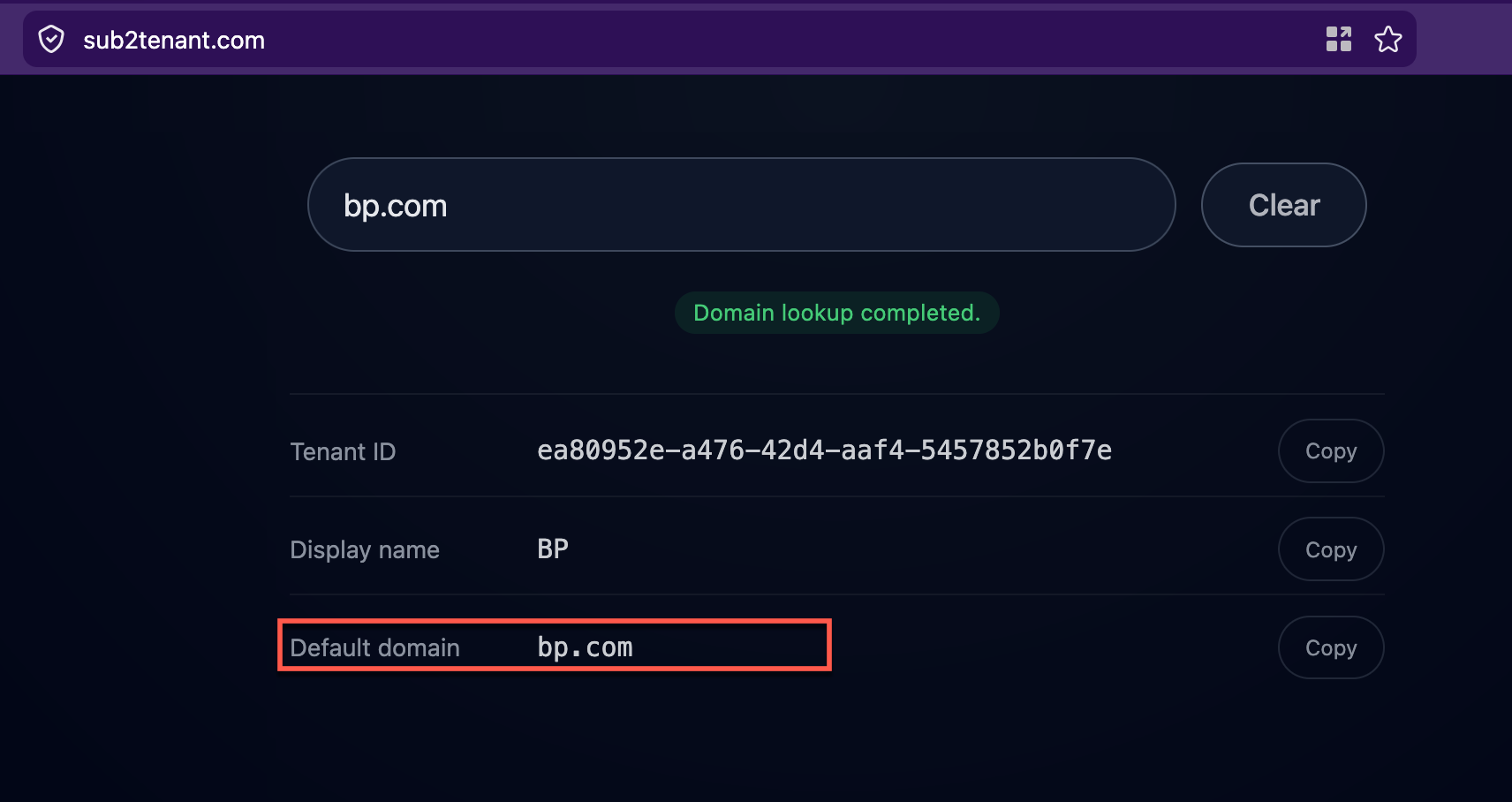
Graph gives you bp.com as the default domain, not the onmicrosoft.com prefix. But DKIM gives us the real tenant name.

The actual prefix is bp365. You'd never get that from the Graph API alone, and again, brute-forcing is not an elegant solution. Between the two techniques, you get close to full coverage: DKIM always contains the initial domain prefix regardless of what the admin sets as "default," and for targets where DKIM doesn't exist, the Graph API fills the gap.
If you want to run Graph yourself, register a free app in any Entra ID tenant, and grant it CrossTenantInformation.ReadBasic.All (application permission, admin consent from your own tenant), and call the API with a client credentials token.
Because tenant enumeration is dead, we’ve decided to update azmap.dev to include these techniques and provide the tenant name for an organization. We've also put together a less elegant but temporary workaround for returning related domains until someone discovers another enumeration technique.
How azmap.dev works now
In Part 1, we floated the idea of pre-building a database of domain-to-tenant mappings as a fallback if the live endpoint ever died. Micah VanDeusen had already done exactly this with tenant-domains, scanning 400 million domains and building a lookup index.
His tool is great, and we recommend others check it out as well. But for our needs, we wanted something that also resolves the tenant name in the same response, stays current as new tenants get registered, and ingests unknown domains on the fly so anything we're missing gets added to the database and correlated for future lookups.
We decided to also scan over 600 million domains against the Microsoft ODC provider endpoint. One GET request per domain, tenant GUID in the response or nothing. Every domain that returned a tenant ID went into a Cloudflare D1 database as a domain -> tenant_id mapping.
The result is a pre-built lookup table. When you query azmap.dev/api/tenant?domain=contoso.com, the first thing it does is check if we already have the tenant ID. If we do, no external call needed. If not, it resolves the tenant ID live and adds the result to the database for next time.
Every user query against an unknown domain teaches the system. We also pull newly registered domains daily, so freshly spun-up tenants can get picked up too.
Now we can query a domain, get its tenant ID, and then query the database for all other domains sharing that same tenant ID. For well-known tenants, we have hundreds of related domains pre-indexed from the scan.
For tenant name resolution, azmap.dev runs through the techniques covered above in a waterfall: DKIM across all related domains first (not just the one you queried), then the authenticated Graph API request, then finally brand name brute-force as a last resort.
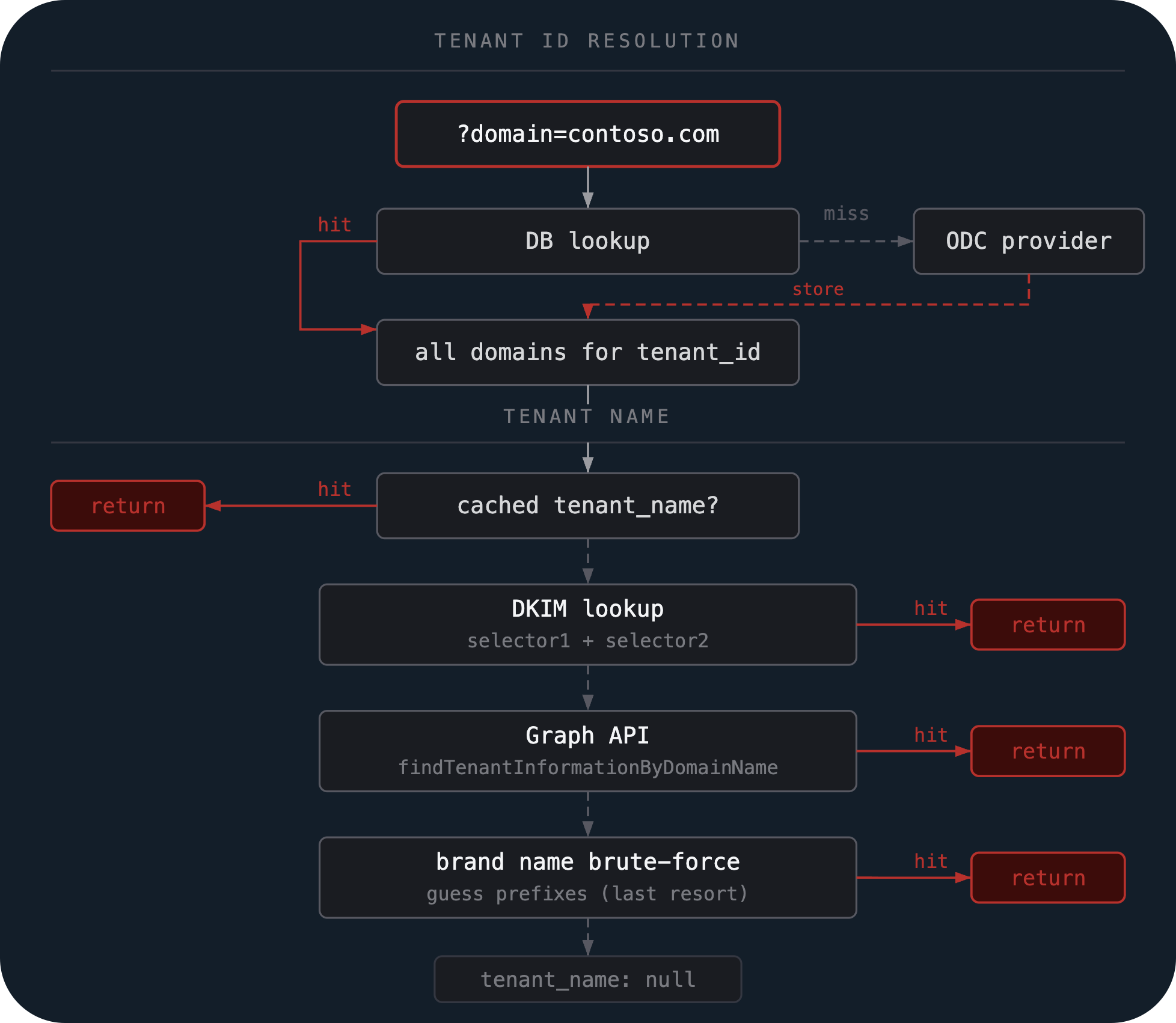
Results are cached, so subsequent lookups for any domain in that tenant come back instantly.
In part one, the API was simple. You'd query a domain and get back the tenant ID, tenant name, and optionally the full domain list with extract=true. The new API always returns everything in a single call:
Request
curl -s "https://azmap.dev/api/tenant?domain=tesla.com" | jq .
Response
{
  "tenant_id": "9026c5f4-86d0-4b9f-bd39-b7d4d0fb4674",
  "tenant_name": "teslamotorsinc",
  "brand_name": "Tesla",
  "domain": "tesla.com",
  "related_domains": [
    "tesla.com",
    "teslamotors.com",
    "solarcity.com",
    "teslagrohmannautomation.de",
    "siilion.com",
    "perbix.com",
    "tesla.services"
  ],
  "related_count": 7
}
You can also look up a tenant ID directly:
Request
curl -s "https://azmap.dev/api/tenant?tenant_id=72f988bf-86f1-41af-91ab-2d7cd011db47" | jq .
Response
{
  "tenant_id": "72f988bf-86f1-41af-91ab-2d7cd011db47",
  "tenant_name": "microsoft",
  "brand_name": "Microsoft",
  "related_domains": [
    "microsoft.com",
    "xbox.com",
    "github.com",
    "linkedin.com",
    "citusdata.com",
    "cloudknox.io",
    "mojang.com",
    "skype.com",
    "npmjs.com",
    "..."
  ],
  "related_count": 136
}
The tenant_name field is the MOERA prefix, ready to plug into tools like onedriveuserenum, MDI discovery, or SharePoint brute-forcing. The brand_name is the display name from GetUserRealm, included for reference but not what your tooling needs. And the related_domains field gives you every domain we know about for that tenant from our scan.
The API is still free and still running on a Cloudflare worker. Same deal as Part 1: don't hammer it, be reasonable, and it stays up for everyone.

Wrapping up
We'll keep azmap.dev updated as the backend techniques evolve. If you find something we missed, let us know.
We’ll keep feeding these new domains and do our best to keep the data updated. As we mentioned in Part 1, this is a stopgap, not a permanent solution. The data will improve as more people use it, and hopefully someone out there will discover new techniques and use cases for this tool!