


Key Takeaways:
- JavaScript files served to browsers are a growing but still under-covered source of hardcoded secrets including AWS credentials, CI/CD tokens, and API keys. AI-assisted development is accelerating the problem as more code ships faster with less manual review.
- Sprocket Security crawls our entire client base's web footprint, renders pages with headless browsers, parses all loaded JavaScript, extracts known key patterns and high-entropy tokens, and automatically validates discovered credentials.
- A Vite misconfiguration on one client's site was passing
.envsecrets directly into client-side JavaScript including live AWS credentials and a CircleCI API key. - The AWS keys gave us access to S3 buckets containing the full production codebase, enabling in-depth vulnerability hunting against the application itself. The CircleCI token gave us full control over the production CI/CD pipeline, all stored secrets, and ultimately their GitHub repositories.
- The combined access represented complete compromise of the client's build-to-deployment infrastructure, all from a JavaScript file anyone with a browser could read.
We reported this to the client and had it resolved within hours. This type of finding only surfaces through continuous testing where testers have time to build purpose-built tooling.
The JavaScript Secrets Problem
Every JavaScript file your web application serves is public. That's by design: the browser needs to download, parse, and execute it. Every visitor to your site gets a copy.
And yet, secrets end up in these files constantly. AWS access keys. CI/CD tokens. Internal API keys. Database connection strings. Not because developers are careless, but because modern frontend build tooling makes it remarkably easy to accidentally compile sensitive values into a production JavaScript bundle without realizing it.
Here at Sprocket, we test tens of thousands of assets at scale as part of our Continuous Penetration Testing practice. We’ve seen the same pattern for years: clients with mature security programs, running scanners, doing annual pentests — and very few of them were systematically checking what was inside their JavaScript files. Some security teams and researchers are absolutely doing this work, and it's becoming a more recognized attack surface. But in our experience, it's still a lesser-tapped opportunity that most organizations aren't covering consistently - especially as AI-assisted development accelerates the pace of code shipping to production.
Because of this, we’ve built automated techniques to hunt for it at scale. And what those techniques found across our client base confirmed the hunch, but one recent finding in particular turned a misplaced .env variable into full compromise of a client's app deployment, their CI/CD pipeline, and their GitHub repositories. All from a single JavaScript file.
In this post, I'll walk through how we’re uncovering this issues, why this class of exposure exists in the first place, and the full attack chain from "interesting JS file" to "we own your deployment infrastructure."
How Do Secrets End Up in JavaScript Files?
Secrets end up in client-facing JavaScript files primarily through frontend build pipeline misconfigurations. Modern frameworks like Vite, Webpack, Next.js, and Create React App use environment variables at build time — and the line between "server-side only" and "bundled into the client" is thinner than most developers realize.
Take Vite as an example. Vite exposes any environment variable prefixed with VITE_ to client-side code via import.meta.env. Variables without the prefix stay server-side. That's a clean design in theory. In practice, a developer who needs a quick fix might add VITE_ to an AWS key or an API token to get it working in the frontend, fully intending to "fix it later." It ships. Nobody catches it. Now it's sitting in a minified .js bundle served to every visitor.
This isn't limited to Vite. The same pattern exists across frameworks:
- React (Create React App): Variables prefixed with
REACT_APP_get compiled into the bundle - Next.js: Variables prefixed with
NEXT_PUBLIC_are exposed client-side - Vue CLI: Variables prefixed with
VUE_APP_are embedded at build time - Vite: Variables prefixed with
VITE_are exposed viaimport.meta.env
Beyond framework misconfigurations, there are other common sources: inline configuration objects with hardcoded keys, debug or staging code that made it to production, third-party SDKs initialized with API keys directly in the source, and source maps left enabled in production that expose the full original (unminified) source code.
The critical point for security teams is this: while some researchers and offensive practitioners are hunting for secrets in JavaScript and it's an increasingly recognized attack surface — most organizations aren't covering this systematically in their security programs. Traditional DAST scanners and vulnerability management platforms generally don't parse JavaScript file contents for credential patterns, at least not well. Secret detection tools like truffleHog and gitleaks are capable of scanning arbitrary files and directories, but in practice most organizations deploy them against source repos and commit history as part of CI/CD pre-commit or pre-merge workflows. The tools aren't the gap — it's how they're being utilized. The live JavaScript that's actually reaching users' browsers is usually outside the scope of what these tools are configured to check which is how we’re approaching the problem.
And the problem is getting worse. As AI-assisted development tools accelerate the pace of code production, more code is shipping faster with less manual review. A developer using Copilot or Cursor to scaffold a frontend integration might accept a suggestion that references an environment variable with a VITE_ prefix without thinking twice about the implications. The speed that AI brings to development is fantastic for productivity — but it compresses the window for catching misconfigurations like this before they hit production.
How We Hunt JS Secrets at Scale
The manual version of this is straightforward enough: visit a site, click around while proxying the app, look at the HTTP history for JS files, search for strings that look like keys. We've all done it during a web app engagement.
The problem is scale. We're not testing one application; we're continuously testing across our entire client base. Doing this by hand doesn't work when you're looking at thousands of web applications and tens of thousands of JavaScript files. We needed something that could crawl everything, parse everything, and surface the real findings without drowning us in noise.
The Architecture
The scanner works in a few stages:
1. Crawl and render. Our approach takes in targets from our Attack Surface Monitoring (”ASM”) data and crawls the web footprint. Critically, it uses headless browsers to render each page. This matters because modern single-page applications load JavaScript dynamically - you can't just scrape the HTML source and pull <script> tags. You need the page to actually execute so you can capture every JS file that gets loaded, including lazy-loaded bundles, dynamically imported modules, and inline scripts injected at runtime.
2. Parse and extract. Once we have the full set of JavaScript files for each target, the scanner runs two types of detection:
- Known key patterns. Regex-based matching for well-known credential formats. AWS access key IDs follow the pattern
AKIA[0-9A-Z]{16}. CircleCI tokens, GitHub tokens, Supabase keys, Slack webhooks, Stripe keys — they all have recognizable structures. These get flagged with high confidence. - High-entropy token detection. For secrets that don't follow a known format, the scanner calculates entropy on string values and flags anything above a threshold that looks like it could be a key or token. This catches things like generic API keys, secrets, and custom tokens that don't have an obvious pattern.
3. Auto-validate. For known credential types, the scanner automatically validates whether the credentials are live. For AWS keys, it runs the equivalent of aws sts get-caller-identity. For other token types, it makes safe, read-only API calls to confirm the token is active. This is important — it's the difference between reporting "we found something that looks like a key" and "we confirmed this key is live and has access to production resources."
4. Deduplicate and report. Results are deduplicated across targets (the same JS bundle might be served from multiple subdomains), scored by confidence level, and structured for tester review.
The result is a tool that can run across our entire client base and surface real, impactful findings.
What We’ve Found Across Our Client Base
I'll keep this high level to protect our clients, but the aggregate results were eye-opening.
Across the environments we scanned, secrets in production JavaScript were far more common than most security teams would expect. The most frequent findings by category:
- API keys for third-party services — the most common by volume. SaaS platform keys, analytics tokens, payment processor test keys (and occasionally live ones), mapping service keys. Many of these were low-impact individually but indicated a systemic pattern of shipping environment variables into the client bundle without detection.
- Internal URLs and endpoints — not credentials per se, but internal API endpoints, staging environment URLs, and admin paths that weren't intended to be public. Useful for further enumeration and attack surface mapping.
- Cloud provider credentials — AWS access keys, GCP API keys, Azure connection strings. Less common than generic API keys, but when they showed up, the impact was usually significant.
- CI/CD and source control tokens — CircleCI, GitHub, GitLab tokens, Supabase JWTs, etc. The rarest category but far and away the highest impact when found.
- High-entropy tokens — generic secrets that didn't match a known pattern but were clearly credential material based on context. JWT signing secrets, custom API tokens, webhook secrets.
The most impactful finding - the one I'll walk through in detail below - came from a single application that was running Vite with a misconfiguration that was passing .env secrets directly into the JavaScript bundle. Among those secrets: live AWS credentials and a CircleCI API token.
The Attack Chain: From JavaScript File to Full Infrastructure Compromise
Discovering the Vite Misconfiguration
During a review of the results a few weeks ago, one finding stood out immediately. Secrets discovery had flagged a Vite-bundled JavaScript file on a client's production web application with two high-confidence hits: an AWS access key ID with a confirmed valid secret key, and a CircleCI API token matching the known ccl_ prefix format.
Looking at the context, both values were being pulled from import.meta.env.VITE_* variables. This was the tell. The developer had prefixed these secrets with VITE_ which in Vite's build system means "bundle this into the client-side JavaScript." Whether this was intentional (trying to get something working quickly) or accidental (copy-pasting from a server-side config), the result was the same: these secrets were compiled into the production JS bundle and served to every visitor.
The scanner had already auto-validated the AWS credentials — sts:GetCallerIdentity came back with a valid IAM user. These keys were live.
# Identify who we are
$ aws sts get-caller-identity
{
    "UserId": "AIDA████████████████████",
    "Account": "████████████",
    "Arn": "arn:aws:iam::████████████:user/████-deploy"
}
The IAM user name alone was telling — this was a deployment service account. I started enumerating permissions and quickly found that the credentials had read and write access to several S3 buckets.
# List accessible buckets
$ aws s3 ls
2025-██-██ ██:██:██ ████-production-app
2025-██-██ ██:██:██ ████-staging-app
2025-██-██ ██:██:██ ████-build-artifacts
The production application bucket contained the full deployed codebase, not just the frontend assets (which we already had from the JavaScript bundle), but the server-side application code, configuration files, and deployment manifests.
# Pull down the production codebase
$ aws s3 sync s3://████-production-app ./exfil/ --quiet
download: s3://████-production-app/server/...
download: s3://████-production-app/config/...
download: s3://████-production-app/.env.production/...
...
This was a significant escalation on its own. Having the full server-side source code meant I could now conduct in-depth vulnerability hunting against the application itself — reviewing authentication logic, looking for SQL injection in query builders, tracing data flows, and identifying business logic flaws with complete source code visibility rather than black-box testing. The server-side code also disclosed additional configuration details, internal service endpoints, and database connection patterns that would be valuable for further exploitation.
But the real story was what came next.
CircleCI: Full CI/CD Pipeline Control and GitHub Access
Now let's talk about that CircleCI token.
CircleCI API tokens come in different permission levels. I needed to find out what this one could do. A quick API call confirmed the worst case:
# Check token scope
$ curl -s -H "Circle-Token: ccl_████████████" \
  https://circleci.com/api/v2/me | jq .
{
    "login": "████████",
    "name": "████ ████",
    ...
}
The token was tied to a user account with full access. Let's break down what that meant in practice.
Listing all projects and pipelines. I could see every project configured in the client's CircleCI organization, their build histories, pipeline configurations, and deployment workflows.
# List projects
$ curl -s -H "Circle-Token: ccl_████████████" \
  https://circleci.com/api/v2/project/gh/████/████/pipeline | jq '.items[].id'
Accessing stored environment variables. This is where it gets bad. CI/CD platforms store secrets as environment variables — database credentials, deploy keys, API tokens for downstream services, signing keys. CircleCI's API allows you to list (and in some cases retrieve) these variables.
The environment variables stored in CircleCI contained additional secrets that weren't in the JavaScript bundle: database credentials, additional AWS keys with different permission scopes, webhook signing secrets, and — critically — GitHub access tokens.
GitHub repository access. CircleCI's integration model connects to GitHub via OAuth. The token's associated user account had access to the client's GitHub organization. Through the CircleCI integration and the additional GitHub tokens found in the environment variables, I could:
- Read and clone all repositories in the organization — including private repos containing infrastructure-as-code, deployment configurations, and internal tooling
- View commit history, pull requests, and code reviews
- Access GitHub Actions workflows and their associated secrets
- In a real attack scenario, push code changes or modify CI/CD pipeline definitions to inject malicious code into the build process
At this point, the chain was complete.
The Full Chain
Let me lay this out end to end:
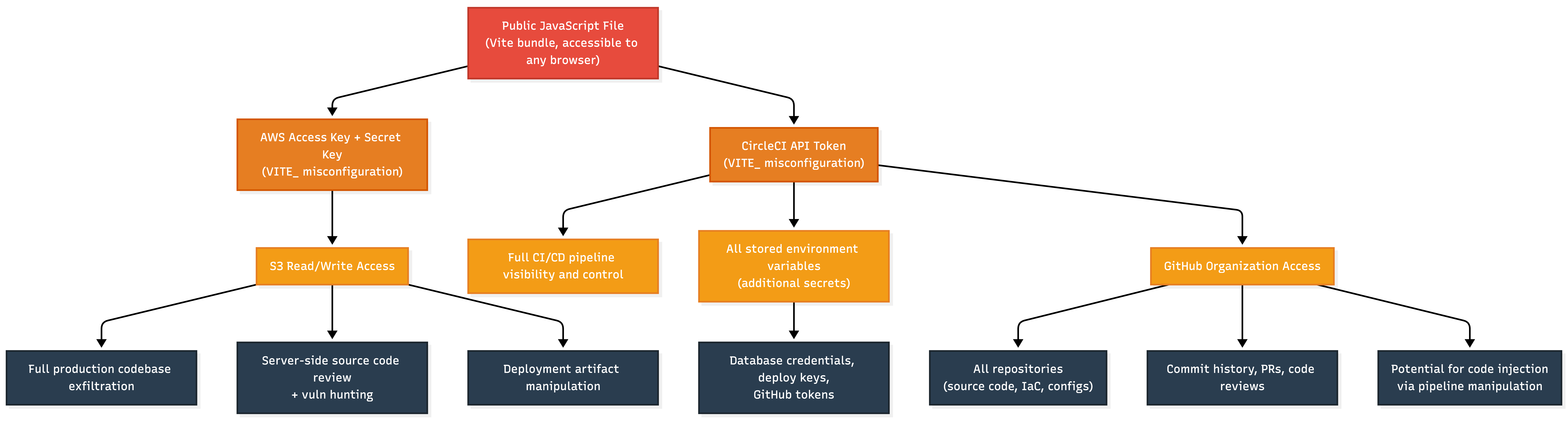
From a single misconfigured Vite environment variable prefix, an attacker could have gained complete control over this client's application source code, build pipeline, deployment infrastructure, and production environment. That's source to deployment — the entire software supply chain for this application.
We reported this to the client immediately. To their credit, they moved fast - the credentials were rotated, the Vite configuration was fixed, and the exposure was resolved within hours of detection.
How to Prevent Secrets from Leaking into JavaScript Files
If you're reading this and wondering whether your own applications have this problem, here's what to do.
Audit your production JavaScript bundles right now. Don't wait for a pentest. Open your production site, look at the JS files being served, and search for anything that looks like a credential. Better yet, use a tool that automates this — whether it's something you build internally or something your security testing partner provides. While awareness of this attack surface is growing in the industry, most organizations we test still don't have this covered in their detection stack.
Review your frontend build configuration. For Vite, ensure that only genuinely public values use the VITE_ prefix. For React, audit REACT_APP_ variables. For Next.js, audit NEXT_PUBLIC_ variables. Any credential, token, or secret that grants access to infrastructure, CI/CD, cloud services, or internal APIs should never carry a client-side prefix. This sounds obvious, but the fact that we're finding live AWS keys in production JS bundles tells you it's not being enforced consistently.
Scan the built output, not just the source. Most secret scanning tools (truffleHog, gitleaks, etc.) run against source code repositories. That's valuable, but it misses the case where a build process compiles server-side secrets into client-side bundles. Add a CI/CD step that scans the built artifacts — the actual JS files that will be deployed — for credential patterns before they ship to production.
Stop using long-lived static credentials. The AWS keys in this finding were static IAM user access keys — the kind that live forever unless someone manually rotates them. For AWS, use IAM roles with STS temporary credentials instead. For CI/CD tokens, scope them to the minimum required permissions and set expiration policies. The blast radius of a leaked credential is directly proportional to how long it's valid and how much it can access.
Disable source maps in production. Source maps make debugging easier, but they also expose your full unminified source code including comments, variable names, and file structures that make it trivial to find secrets and understand application logic. Turn them off in production builds.
Assume anything that's been in client-side JS has been seen. If you discover that a secret was ever served in a JavaScript file, treat it as compromised regardless of how long it was exposed. Rotate it. Don't assume nobody noticed — automated scanners (like the one we built) and attackers are looking for exactly this.
If you're curious whether your JavaScript files are leaking secrets or whether your external perimeter has exposures that scanners aren't catching; we'd be happy to show you what we find. Reach out to Sprocket Security to learn more.
Stay up-to-date on the latest exploits and industry news by following the Sprocket Security blog.