
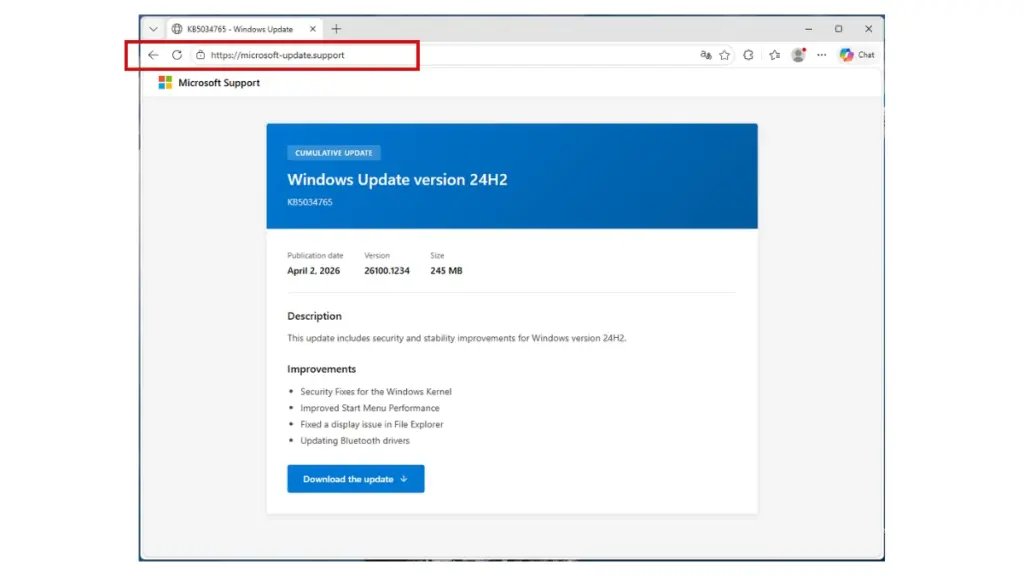
Picture this: you land on what looks like a Microsoft support page. It's showing a Windows cumulative update, complete with a legitimate-looking KB article number, and there's a big download button. You click it. A few seconds later, malware is quietly pulling your saved passwords, browser credentials, and Discord account details off your machine.
That's the scenario researchers at Malwarebytes recently documented. It's a good reminder of just how polished these attacks have gotten.
The Fake Site Looks Completely Legitimate
The campaign is built around a typosquatted domain (microsoft-update[.]support) that's styled to look like a real Microsoft support page. The site is written in French and shows what appears to be a cumulative update for Windows 24H2, right down to a believable KB article number.
Typosquatting (registering domains that closely mimic trusted brands) has been around forever, but it keeps working. When a page looks official, most people don't stop to verify the URL before clicking download.
Two Malicious Payloads, One Installer
Clicking the fake update delivers a file called WindowsUpdate 1.0.0.msi, an 83 MB Windows Installer package built to pass as a real system update. Inside, there are two separate malicious components:
- A credential stealer (~7 MB): The main payload. It uses cryptographic routines (PBKDF2, SHA-256, and AES decryption) to pull saved passwords and sensitive data out of browsers and other apps. It even includes a campaign expiry check, which suggests the attackers are running this as a structured, time-limited operation.
- A Discord token hijacker (~1 MB): This one patches Discord's local app code to intercept login tokens, payment info, and two-factor authentication changes the next time the app opens. It's a persistent modification that survives app restarts.
Put together, the two payloads give attackers browser credentials, saved passwords, and a foothold inside the victim's Discord account, including any payment information tied to it.
Antivirus Missed It Completely
Here's what stands out most: when researchers checked both malicious files, they came back with zero detections across major antivirus engines.
That's not a freak result. The malware buries its payload inside what looks like legitimate software packaging and uses heavily obfuscated code on top of that. Traditional, signature-based antivirus tools are looking for known-bad patterns. When the code is new and well-disguised, it just slips through.
Antivirus is still worth having as a baseline, but this is a pretty clear example of why it can't be your only line of defense.
Who Is Being Targeted, and Why
The site is written entirely in French, and that's a deliberate choice. France has been hit by a significant run of data breaches over the past couple of years, and a lot of that stolen personal data is now circulating on criminal markets. Attackers are using that existing data to make their lures more credible and to go after a pool of users who are already exposed.
It's worth keeping that pattern in mind. Regions or industries that have been through major breaches tend to become follow-on targets. The leaked data gives attackers everything they need to build convincing, personalized campaigns.
What Your Team Should Do About It
Even if nobody on your team is a French speaker, this campaign shows attack patterns that show up across industries every day. A few practical steps worth taking:
- Remind employees where real updates come from. Windows updates come through Windows Update in system settings, not from a webpage. Any browser prompt to download system software should be treated as suspicious, no matter how official it looks.
- Watch for typosquatted domains impersonating your brand. Attackers do this to target your customers and employees, not just Microsoft's. Continuously scanning for lookalike domains means you can catch and act on them before anyone lands on one.
- Layer your defenses beyond antivirus. Behavioral monitoring, DNS filtering, and web proxy controls can block access to malicious domains before a file ever hits a machine. The zero-detection result here shows why you need controls that don't rely solely on signatures.
- Enforce MFA everywhere that matters. If a stealer does run successfully, multi-factor authentication limits what an attacker can actually do with the credentials they grabbed. Prioritize privileged accounts and anything tied to financial or sensitive data.
Attackers Are Putting in the Work
What makes this campaign worth paying attention to isn't just the technical side. It's the effort. A realistic domain. A plausible KB number. A native-language interface. A file size that looks right. Every detail is there to chip away at a layer of skepticism.
Security teams need to keep up with that level of preparation. That means knowing what your organization looks like from the outside, training people to recognize manipulation even when it looks polished, and building layered controls so that one bad click doesn't turn into a full-blown incident.
Source: Malwarebytes: This fake Windows support website delivers password-stealing malware