


If you’ve ever pointed a tool like Nuclei or WPScan at a WordPress target on SiteGround and gotten back absolutely nothing, you’re not alone. It's not a config issue or a network problem. It's a CAPTCHA.
SiteGround doesn’t return a 403 or a 429 when it thinks you're a bot. It returns HTTP 202 Accepted with this header:
HTTP/2 202
sg-captcha: challenge
Your scanner sees a 202 and keeps going. Every request after that also returns a 202. The scan finishes. Zero results, but it looks like everything worked. The server was waiting for you to solve a JavaScript proof-of-work puzzle, and your tool had no idea that was even happening.
<html>
<head><title>Robot Challenge Screen</title></head>
<body>
<script>
const sgchallenge = "20:1721362140:a3f8b2c1:e4d7f6a9c2b1..." ; //iykyk
const sgsubmit_url = "/.well-known/sgcaptcha/?r=%2Fwp-login.php";
const sgfallback_url = "/.well-known/captcha/?y=ipc:<VISITOR_PUBLIC_IP>:1721362140&r=%2F"
// Spawns 8 web workers to brute-force nonce
for (var n = 0; n < 8; n++) {
    var worker = new Worker(blobURL);
    worker.postMessage({
        challenge: sgchallenge,
        start: offset + n * 5000000,
        end: offset + (n + 1) * 5000000
    });
}
</script>
<noscript>
  <meta http-equiv="refresh" content="0; url=/.well-known/captcha/?y=ipr:<VISITOR_PUBLIC_IP>:1721362140&r=%2F">
</noscript>
</body>
</html>
This is SGCaptcha. It ships on every SiteGround WordPress site, there's no self-service toggle to disable it, and it will quietly eat your entire scan if you don't know what you're looking at. Here's how it works under the hood and how to bypass it.
What Is a Proof-of-Work CAPTCHA?
Traditional CAPTCHAs ask humans to prove they're human by doing something a computer supposedly can't do easily. Identify a fire hydrant, type distorted text, that sort of thing. The problem is that computers have gotten a lot better at these types of challenges.
Proof-of-work (PoW) CAPTCHAs flip the model. Instead of asking you to do something only humans can do, they ask your browser to do something computationally “expensive”. Specifically, to find a number (a nonce) that, when combined with a server-provided challenge and hashed, produces a result with a specific property.
The core idea is that finding a valid nonce is hard, but verifying it is trivial. The server hands you a challenge, your browser grinds through hashes until it finds one that works, and then submits the answer. The server does one hash to confirm, and that’s it. The whole thing takes about the same time as a page load.
From a bot-prevention standpoint, it’s great. There's nothing to image-classify, no external service to intercept, and the puzzle is different every time. More importantly, solving it requires executing JavaScript, which most tools don't do.
SiteGround’s SGCaptcha
SiteGround rolled out its "Anti-Bot AI" system in 2017 and overhauled it in September 2023 to analyze traffic across all its servers at once. When it decides you look like a bot, you get the captcha.
Here's what happens when it triggers.
Step 1: The 202
Any request to a protected endpoint or containing potentially malicious parameters will come back like this:
HTTP/2 202
SG-Captcha: challenge
X-Robots-Tag: noindex
Cache-Control: no-store,no-cache,max-age=0

<html><head>
<meta http-equiv="refresh" content="0;/.well-known/sgcaptcha/?r=%2Fwp-login.php&y=ipc:<YOUR_SOURCE_IP>:1721362140">
</head></html>
The body is a redirect to the challenge page. The y=ipr: (or sometimes y=ipc:) parameter contains your IP and a timestamp, which I assume feeds into their reputation scoring.
One thing to note here is the X-Robots-Tag: noindex header in that 202 response. When Googlebot triggers the captcha, it gets that header too. Google sees noindex, obeys it, and de-indexes the page.
Step 2: The Challenge Page
Following the redirect lands you at /.well-known/sgcaptcha/, which serves a page titled “Robot Challenge Screen”
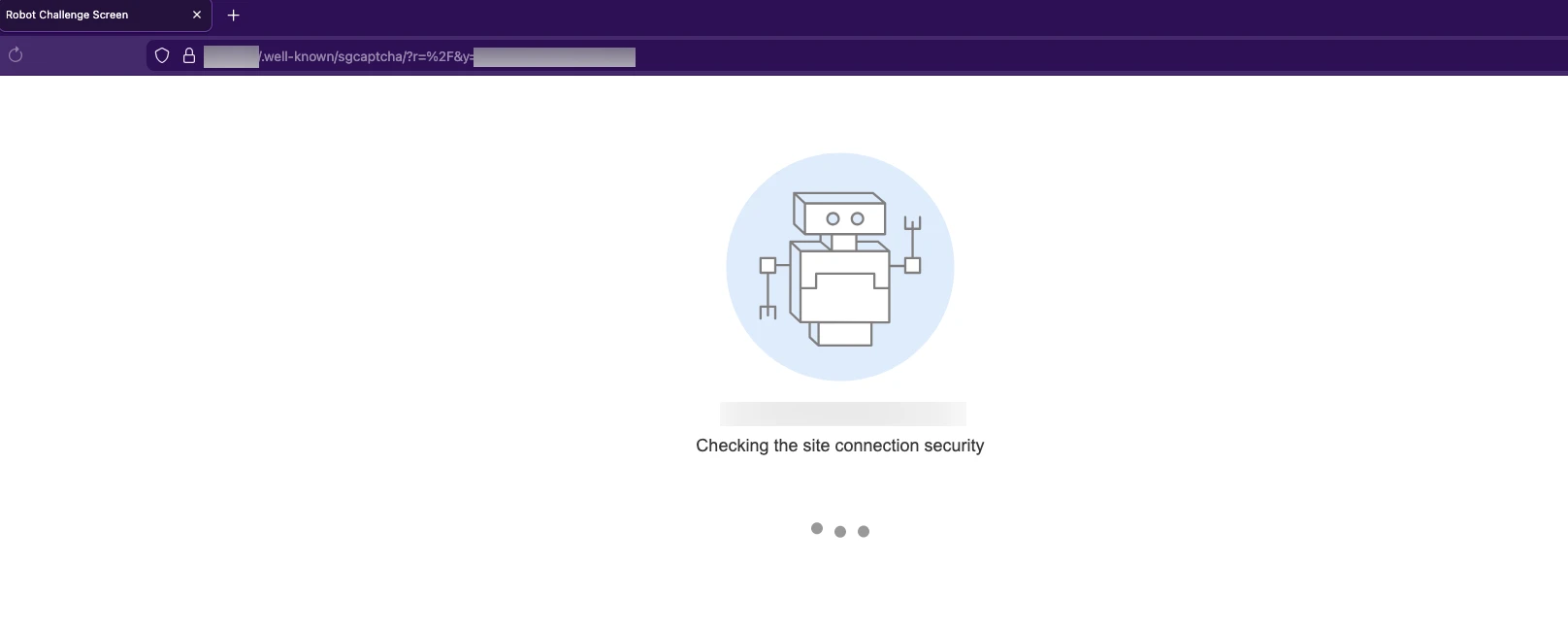
The page contains three JavaScript constants:
const sgchallenge = "20:1721362140:109e46d1:4aa8fbc9b40b4984eaceba60ee33137c...";
const sgsubmit_url = "/.well-known/sgcaptcha/?r=%2F";
const sgfallback_url = "/.well-known/captcha/?y=ipr:<YOUR_SOURCE_IP>:1721362140&r=%2F";
The sg challenge string breaks down like this:
20         : 1721362140 : 109e46d1 : 4aa8fbc9b40b...
^^           ^^^^^^^^^^   ^^^^^^^^   ^^^^^^^^^^^^^^^
complexity   timestamp    random     SHA256 hash
(bits)
That first field is the difficulty. It sets how many leading zero bits the hash needs. The server uses SHA256 to generate that last field in the challenge string, but the actual proof-of-work grind uses SHA1. Your browser is computing SHA1(challenge + nonce) millions of times.
Side Note: There's also a noscript fallback that redirects to /.well-known/captcha/ (without the "sg" prefix), a separate traditional captcha for browsers with JavaScript disabled. But bypassing these types for automated scanning is a problem others have tackled and not one I’ll be diving into today.

Step 3: Grind Time
The page spins up eight web workers using an inline Blob URL. Each worker gets assigned a search range of five million nonces with a randomized starting offset, so they're not all searching the same space:
// From the deobfuscated source
var s = 5e6; // 5 million per worker
var u = Math.round(Math.random() * s); // random start offset

for (var n = 0; n < 8; n++) {
    var c = new Worker(u + n * s, complexity);
    // Worker 0: searches u to u+5M
    // Worker 1: searches u+5M to u+10M
    // so on and so forth and what have you
}
Each worker runs batches of 20,000 SHA1 hashes per tick using CryptoJS. The validation logic is as follows:
hash = SHA1(challenge + nonce)
valid = (hash.words[0] >>> (32 - complexity)) === 0
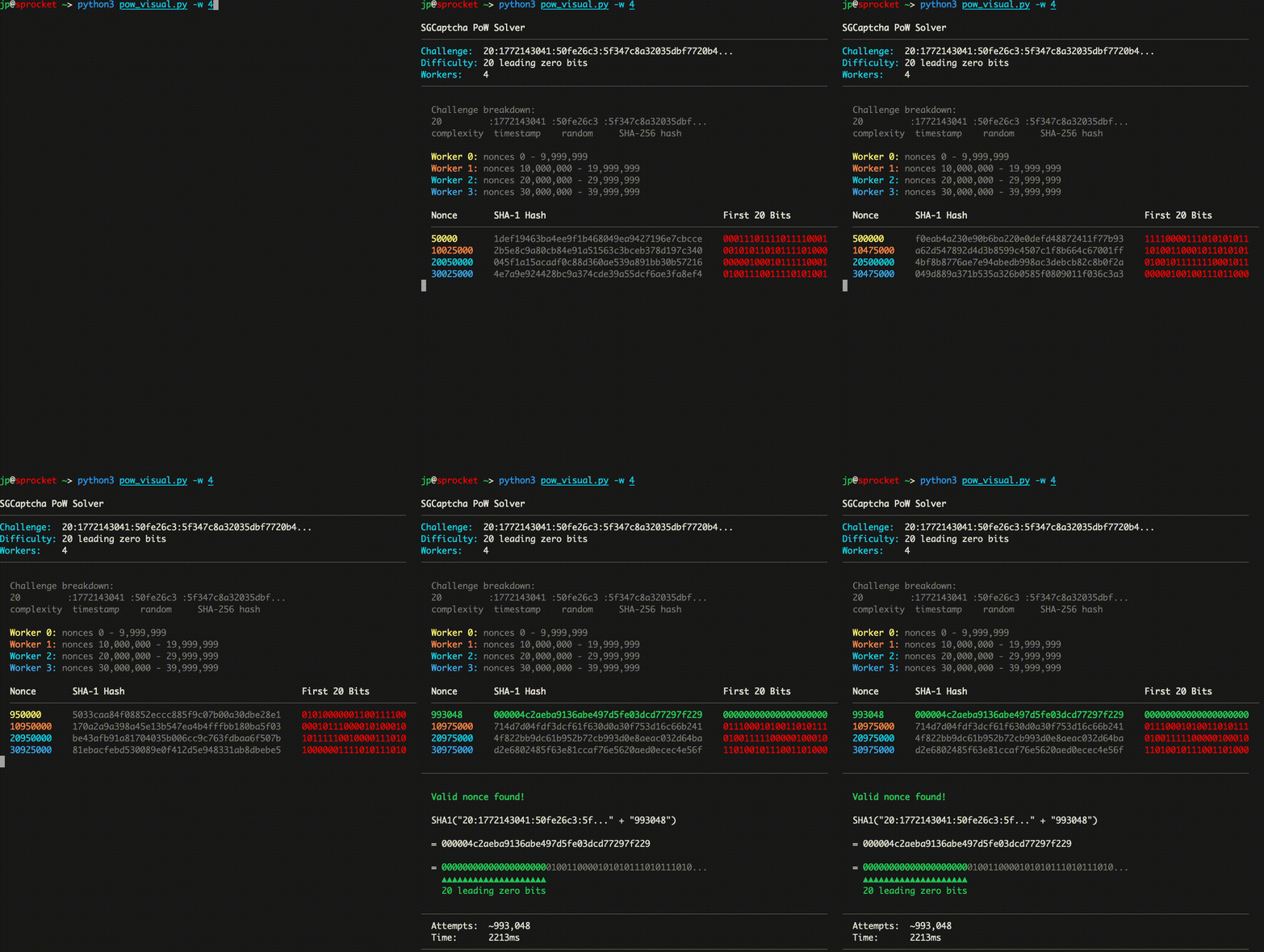
Essentially, the browser guesses numbers until the hash output starts with 20 leading zero bits. At 20-bit complexity, each nonce has a 1 in 2^20 (~1 in 1,048,576) chance of producing a valid hash, so on average it takes about a million guesses to find one. With eight workers running in parallel, the average browser can burn through it in 50-500ms. If no worker finds a solution within 10 seconds, the page falls back to the traditional CAPTCHA URL.
Here’s a visual representation of what that process can look like with just four workers:
Step 4: Show Your Work
Once a worker finds a valid nonce, all workers get killed, and the page redirects with the solution:
/.well-known/sgcaptcha/?r=%2F&sol=<SOLUTION_HERE>&s=156:421234The s= parameter carries solve time in milliseconds and total hashes computed across all workers.
A successful submission will set the _I_ cookie:
Set-Cookie: _I_=<token>; Domain=.target.com; Path=/; Expires=...; HttpOnlyThis cookie will then be attached to every request, allowing you to access the site’s resources without interruption.
At least, that’s how it works if you’re using your browser. Scanners like Nuclei and WPScan don't have JavaScript runtimes. A lot of Nuclei templates will do raw requests with no nuance for handling redirects. That means no puzzle solved, no cookie, and every request returns the same 202. Your scan finishes clean with zero results and no indication that anything went wrong.
Doing the Math
The solution here is actually (in my opinion) easier than dealing with traditional CAPTCHA implementations. The algorithm is deterministic, and it’s sitting right there in the page source. When you navigate to the captcha, the server tells you the hash function, the difficulty, and hands you the challenge string.
So realistically, if we can solve the challenge prior to each request, we could inject that final _I_ cookie back into our scanner to get the results we want.
We can write up a quick Python solver for this:
import hashlib
import base64
import time

def solve_pow(challenge_str, complexity=20, max_attempts=5_000_000):
    start = time.time()
    challenge_bytes = challenge_str.encode('utf-8')

    for nonce in range(max_attempts):
        candidate = challenge_bytes + str(nonce).encode('utf-8')
        hash_bytes = hashlib.sha1(candidate).digest()

        # Mirror the JS validation: hash.words[0] >>> (32 - complexity) === 0
        first_word = int.from_bytes(hash_bytes[:4], byteorder='big')

        if (first_word >> (32 - complexity)) == 0:
            elapsed_ms = int((time.time() - start) * 1000)
            solution = base64.b64encode(candidate).decode('utf-8')
            return solution, elapsed_ms, nonce

    return None, 0, 0
At complexity 20, this should solve under 50ms even on an old laptop. The full workaround can be broken up into three requests.
- Catch the 202 and parse the redirect
- Fetch the challenge page
- Solve, submit, and get the
_I_cookie
From there, we retrieve the cookie and inject it into our scanner.
Now getting that to work with our existing tooling could be a pain if done the wrong way. I enjoy writing templates but prefer not to modify anything like this directly into Nuclei itself. And WPScan is written in Ruby… so no.
And running the solver manually ain’t gonna cut it either. Solving once is fine for a couple of requests. But during an engagement, with hundreds of requests across different tools, you want something that handles this without touching your tooling at all.
The easiest solution would be building a mitmproxy addon. Addons can inspect and modify traffic as it passes through, so you can write scripts to automatically respond to specific requests before sending them back to your tool.
So we can build an add-on that detects captcha responses (202) solve them, and then retry the original request with the newly issued _I_ cookie. The scanner gets a legitimate response back and never has to deal with the captcha in the first place. The cookie gets cached and injected into every subsequent request until a captcha is detected again.
This is just very quick, simple code. Our actual solution is a bit more complex and is also very much a work in progress. But this should be enough to get started.
import hashlib, base64, re, time, requests
from mitmproxy import http, ctx

class SGCaptchaSolver:
    def __init__(self):
        self.cookies = {}   # cached cookies per host
        self.solving = set() # prevent concurrent solves per host

    def request(self, flow: http.HTTPFlow):
        host = flow.request.host
        if host in self.cookies:
            existing = {}
            if "Cookie" in flow.request.headers:
                for c in flow.request.headers["Cookie"].split(";"):
                    if "=" in c:
                        k, v = c.strip().split("=", 1)
                        existing[k] = v
            merged = {**existing, **self.cookies[host]}
            flow.request.headers["Cookie"] = "; ".join(
                f"{k}={v}" for k, v in merged.items()
            )

    def response(self, flow: http.HTTPFlow):
        if flow.response.status_code != 202:
            return
        if flow.response.headers.get("sg-captcha") != "challenge":
            return

        host = flow.request.host
        if host in self.solving:
            return
        self.solving.add(host)

        try:
            self._solve_and_retry(flow)
        finally:
            self.solving.discard(host)

    def _solve_and_retry(self, flow: http.HTTPFlow):
        # Extract redirect to challenge page
        match = re.search(r'content="0;([^"]+)"', flow.response.text)
        if not match:
            return

        base = f"{flow.request.scheme}://{flow.request.host}"
        ua = flow.request.headers.get("User-Agent", "")

        # Fetch challenge page, extract challenge string
        resp = requests.get(base + match.group(1), headers={"User-Agent": ua}, timeout=10)
        challenge = re.search(r'const sgchallenge="([^"]+)"', resp.text).group(1)
        submit_url = re.search(r'const sgsubmit_url="([^"]+)"', resp.text).group(1)
        complexity = int(challenge.split(":")[0])

        # Solve PoW
        solution, elapsed, attempts = self._solve_pow(challenge, complexity)
        ctx.log.info(f"[+] Solved in {elapsed}ms ({attempts:,} attempts)")

        # Collect existing cookies from the original request
        session_cookies = {}
        if "Cookie" in flow.request.headers:
            for c in flow.request.headers["Cookie"].split(";"):
                if "=" in c:
                    k, v = c.strip().split("=", 1)
                    session_cookies[k] = v

        # Submit solution, get cookie
        submit = requests.get(
            base + submit_url + f"&sol={solution}&s={elapsed}:{attempts}",
            headers={"User-Agent": ua},
            cookies=session_cookies,
            allow_redirects=False, timeout=10
        )

        for c in submit.cookies:
            session_cookies[c.name] = c.value
            ctx.log.info(f"[+] Got cookie: {c.name}")

        # Cache cookies for this host
        self.cookies[flow.request.host] = session_cookies.copy()

        # Retry original request with cookie
        flow.request.headers["Cookie"] = "; ".join(
            f"{k}={v}" for k, v in session_cookies.items()
        )
        retry = requests.get(
            flow.request.pretty_url,
            headers=dict(flow.request.headers),
            cookies=session_cookies,
            allow_redirects=False, timeout=10
        )

        # Replace the 202 response with the real one
        flow.response.status_code = retry.status_code
        flow.response.headers.clear()
        for k, v in retry.headers.items():
            flow.response.headers[k] = v
        flow.response.content = retry.content
        ctx.log.info(f"[+] Original request succeeded: {retry.status_code}")

    def _solve_pow(self, challenge, complexity=20):
        start = time.time()
        cb = challenge.encode()
        for nonce in range(5_000_000):
            test = cb + str(nonce).encode()
            h = hashlib.sha1(test).digest()
            if int.from_bytes(h[:4], "big") >> (32 - complexity) == 0:
                ms = int((time.time() - start) * 1000)
                return base64.b64encode(test).decode(), ms, nonce
        return None, 0, 0

addons = [SGCaptchaSolver()]
Here’s a quick demo:
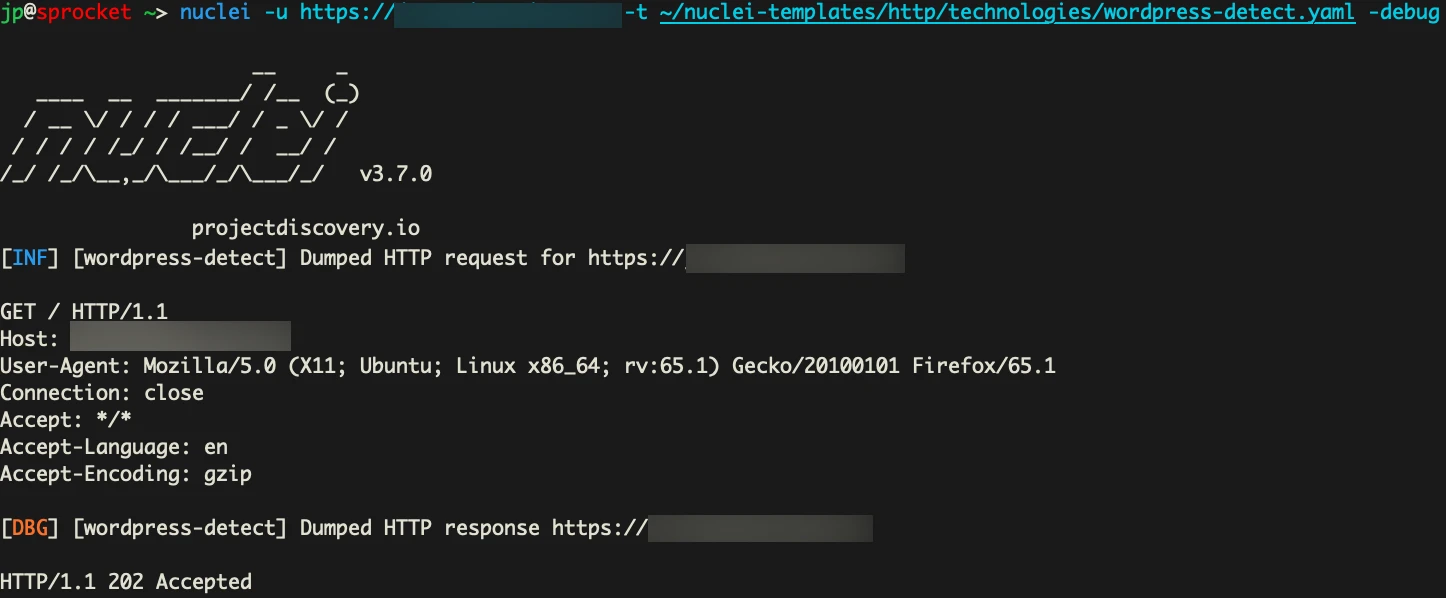
In our first request. We are just trying to detect WordPress using Nuclei. But as you can see, we are hit with the CAPTCHA and 202 code.
Now let’s run our add-on, and see what happens if we force Nuclei to go through our proxy instead.
mitmdump -s SGCaptchaSolver.py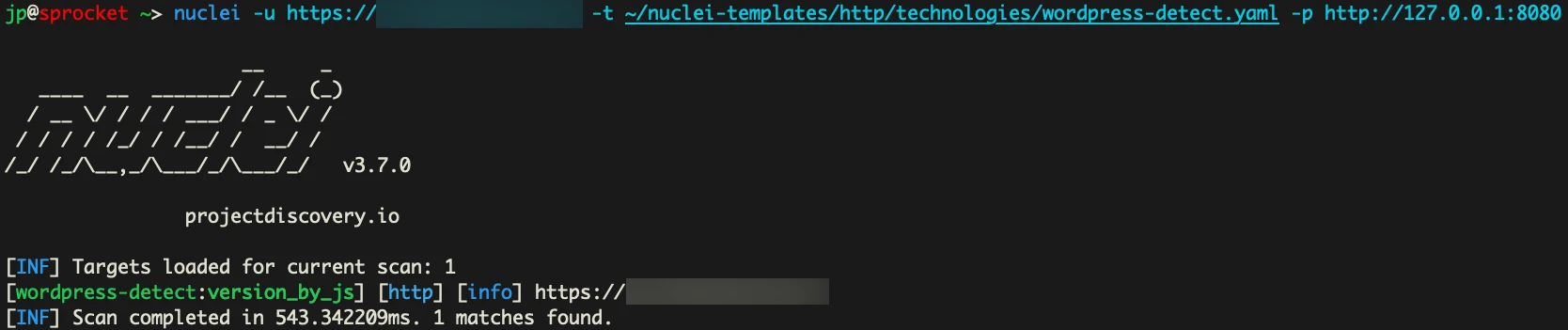
We actually get a match here. Awesome. Looking at mitmdump we can see the longs of what happened.
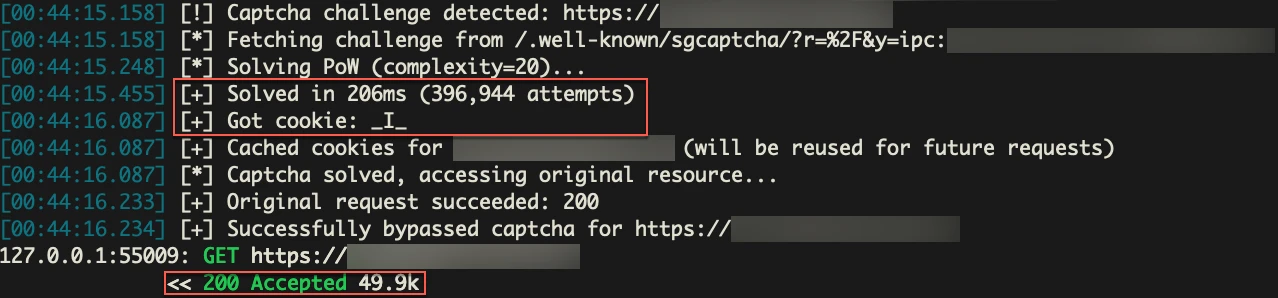
We were able to detect the CAPTCHA, grab the values we needed from the server, solve it, grab the cookie, and rerun the original request with it to get our scanner working.
So this solved the captcha in roughly 200ms. But it won’t always be that fast. This is just very simple, and slow Python code. We can make it faster, but right now, I’m prioritizing the ability to get a cookie once and use it to bypass the CAPTCHA for all future requests until the cookie expires, or the “AI” WAF decides we are malicious again.
What about the AI?
SiteGround markets this as an “AI Anti-Bot” System. The PoW challenge is the part you see, but there's a classification layer behind it deciding who gets challenged in the first place.
WAFs generally make this decision using a combination of signals: IP reputation, TLS fingerprinting, requested content, and many more. No single signal is a hard block. It's a score, and once the score crosses a threshold, you get challenged.
Now we have no idea what SiteGround’s scoring logic is, but we can see some of its output. When the system does decide to challenge you, the captcha redirect URL contains a y= parameter with two different classification states:
# First time being challenged on a host (ipr)
y=ipr:<YOUR_PUBLIC_IP>:1721362140

# After a couple repeated challenges on the same host (ipc)
y=ipc:<YOUR_PUBLIC_IP>:1721362140
We suspect this format is classification:IP:timestamp . A clean IP browsing normally does not see this at all. It gets a straight 200 and no CAPTCHA. The y= parameter only appears once the system has decided to challenge you. From there, ipr seems to be the initial classification on a given host. After repeated requests, it appears to have escalated to ipc and stay there regardless of path or User-Agent. In our testing, there appears to be a short cooldown, but it re-escalates fast.
More than Rate Limiting
We routed traffic through a rotating proxy and sent hundreds of requests to the same SiteGround hosts. Early on, every request came back a clean 200 with no captcha. But as we sent more requests and started hitting paths like wp-login.php, xmlrpc.php, wp-admin, and .env, the system caught on. Eventually, every request through the proxy was getting challenged.
Then we sent requests to other SiteGround-hosted sites that had never been scanned. Captcha on first request, tagged ipr. The reputation followed the IP across hosts.
SiteGround's own documentation describes it this way:
Once our system flags a certain IP address or user agent as malicious,
it's been immediately blocked and challenged with a Captcha page.
[...] If a human visitor reaches the captcha page and solves it,
theaddress/agent related to this solution is whitelisted.
We tested that whitelisting claim. After solving the captcha from a flagged IP, requests with the I cookie returned 200s. Requests without the cookie from the same IP were still 202s. Solving doesn't whitelist the IP every time it seems. It issues a session cookie, which eventually lets you reach the content you requested, but the IP itself stays flagged.
What We Think Is Happening
This is speculative. We don't have access to SiteGround's internals. But the behavior points to something like this:
Before you ever see a captcha, your IP is scored. The inputs are probably similar to what other WAFs use: ASN classification (datacenter vs residential), prior behavior on SiteGround's network, requested paths, and header fingerprints. If the score is low enough, you pass through clean. If it crosses a threshold, you get the PoW challenge.
Once challenged, the system tracks your behavior per-host. That's the ipr to ipc escalation. ipr on first challenge, ipc after repeated challenges. SiteGround.com itself runs the same CAPTCHA system, which means this classification infrastructure spans their entire hosting network. An IP flagged on one site starts getting challenged on others.
For pentesters, this has a practical implication. Scanning one SiteGround client site could build a reputation profile that follows your IP to other SiteGround-hosted targets. Your second engagement might start pre-flagged because of your first.
Bigger Problem with PoW CAPTCHAs
Traditional CAPTCHAs require OCR, machine learning models, or paid solving services to reliably bypass. PoW CAPTCHAs on the other hand essentially give you the solution. The hash function, difficulty, challenge strings, and the solve path is all sitting in the source code waiting to be solved.
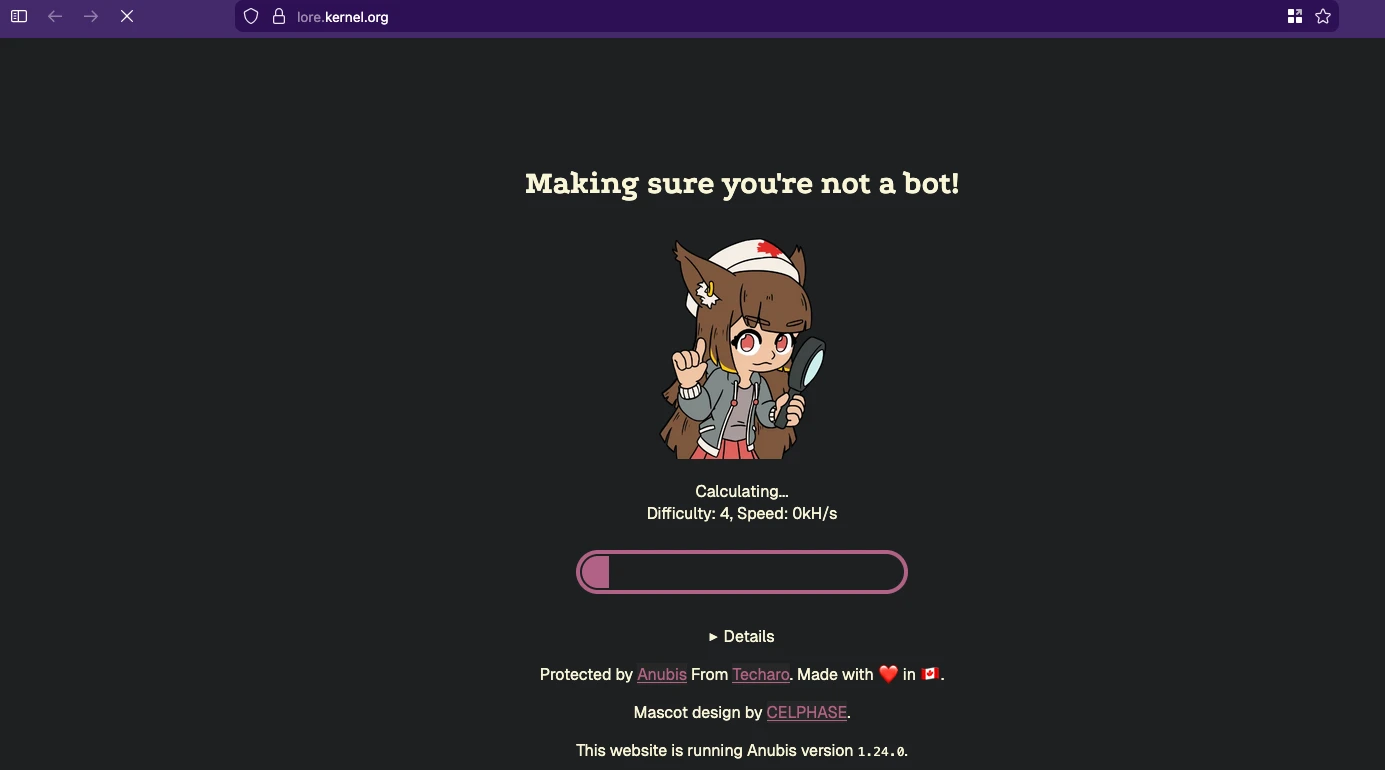
Tavis Ormandy did the math on Anubis, an open-source PoW system that protects web applications using SHA-256 challenges, and found that a free-tier Google Compute Engine instance could mine enough tokens to bypass every Anubis deployment on the internet in about six minutes.
I’d recommend just checking out their blog for more details, especially if you’re also wondering why anime catgirls are blocking your access to sites.
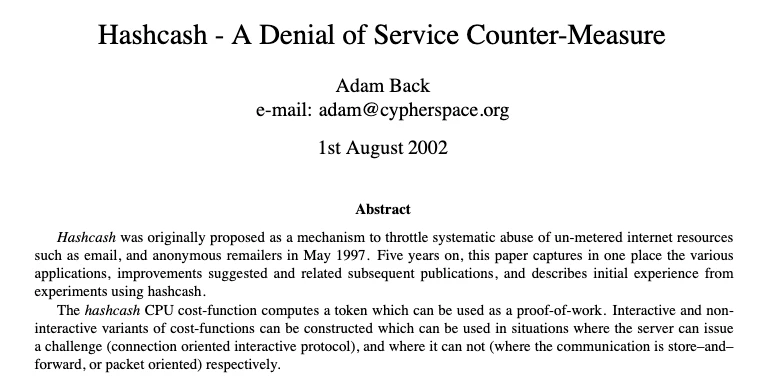
This isn't a new problem either. Adam Back described the same asymmetry in Hashcash back in 2002, one of the earliest PoW anti-spam systems.
<?xml version="1.0" encoding="UTF-8"?> www.hashcash.org
The fundamental issue is that cranking up the difficulty to slow down an attacker with optimized code also punishes legitimate users on slow browsers and low-power devices. The defender can't win that race.
Cloudflare Turnstile takes a different approach. It uses PoW as one layer on top of TLS fingerprinting, browser environment checks, CDP detection, and behavioral analysis. Solving the hash puzzle alone won't get you through. You need a real browser environment, which puts it in headless automation territory (Playwright, headless-chrome, etc.) rather than a simple script. For pure PoW implementations like SGCaptcha, that's not the case.
SGCaptcha also creates problems it probably wasn't designed to. That X-Robots-Tag: noindex header in the 202 response? When Googlebot triggers the captcha, it gets that header too. Google obeys it and de-indexes the page. Site owners on SiteGround have reported entire sites vanishing from search results because of this. One site went from 270 indexed pages down to 62 over three months before they figured out what was happening. The only fix is to contact SiteGround and ask them to disable the anti-bot system. And if you're combining SiteGround with Cloudflare, the problem gets worse since Cloudflare's traffic routing can trip SiteGround's bot detection, leading to redirect loops that neither provider seems eager to own.
Final Thoughts
The code in this blog is just the bare minimum needed to get a scan through SGCaptcha. A lot more would need to be implemented to reliably handle multiple targets and solve challenges in time for each concurrent request. This should still serve as a starting point for anyone encountering PoW CAPTCHAs for the first time.
PoW CAPTCHAs stop tools that don't try. They don't stop people who read the source. The algorithm is public, the solve is fast, and the cookie lasts long enough to cover an entire engagement. If your scanner is returning zero results against a SiteGround target, you're probably not scanning anything at all. Look at the response before you look at your config.
This isn't unique to SiteGround either. Friendly Captcha, ALTCHA, and mCaptcha all use variations of the same mechanic. And as we covered, Anubis has the same fundamental weakness. Cloudflare Turnstile is a different animal, but for a pure PoW implementation, everything you need is in the page source.
We've hit this exact problem on engagements and built our way through it. If that sounds like the kind of testing you need, let us know.