


Identifying a vulnerability is only the first step. The real challenge starts when security and IT teams must translate that finding into a verified fix. Too often, remediation guidance in reports is generic or incomplete, leaving teams digging through documentation and searching for the right commands or configurations.
Sprocket’s new AI Remediation Assistance feature helps close that gap.
Making Remediation Actionable
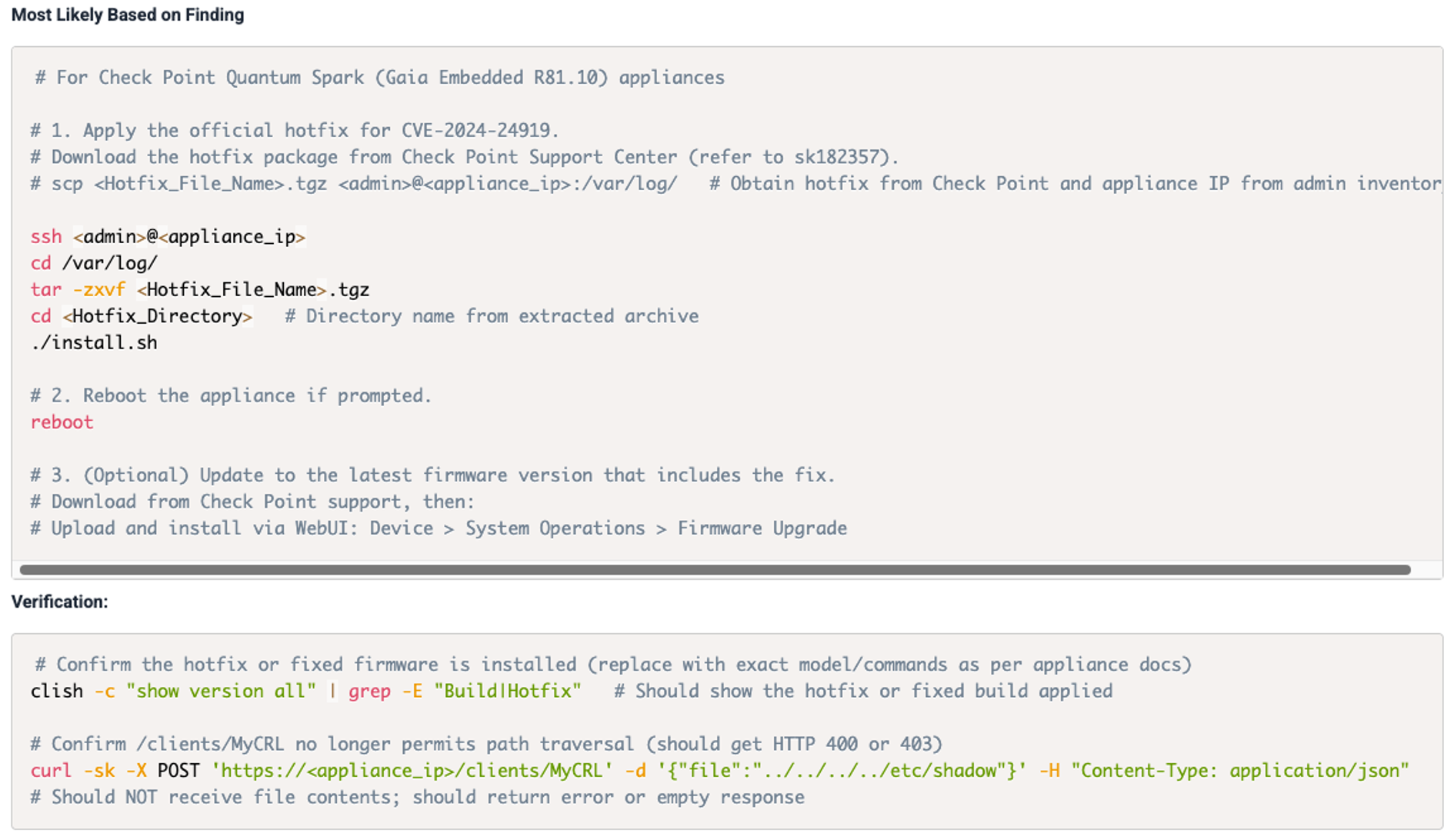
AI Remediation Assistance analyzes the full context of a validated pentest finding, including the vulnerability details, associated technologies, and description. Using that data, the platform generates detailed, step-by-step remediation instructions that align with the environment and technology stack in question.
This guidance doesn’t come from a static knowledge base. It is dynamically generated using carefully scoped AI prompting that identifies the affected technology and tailors instructions to that context. The result is targeted, accurate, and repeatable remediation guidance that helps teams move from discovery to resolution faster.
The example below outlines the remediation process for CVE-2024-24919, including the verification steps used to confirm the fix.
Clarity Over Automation
It’s important to be clear about what this feature is and what it isn’t. AI Remediation Assistance does NOT automate patching or make any changes in your environment. Instead, it provides AI-assisted clarity to help teams act with confidence. The feature generates recommendations and context, but remediation itself remains a human-driven process.
By keeping the human in the loop, Sprocket continues to uphold its core principle: automation should scale human expertise, not replace it.
Transparency and User Control
The AI remediation capability is disabled by default. Organizations must explicitly opt in before any AI powered processing can occur. Even after enabling it, users still decide when it is used by manually selecting “Generate Additional AI Remediation Details” within an individual finding.
This design ensures that AI is only invoked when intentionally requested. Nothing happens automatically, and no data is processed unless a user initiates it.
For teams that prefer not to use AI at all, administrators can leave the feature off or disable it at any time in the platform under:
Company → Enable AI powered remediation suggestions

This approach gives every organization full control over when and how AI is applied to their security workflows. There is no ambiguity, no hidden automation, and no background processing that occurs without a deliberate action from the user.
Strengthening the Remediation Lifecycle
AI Remediation Assistance builds on Sprocket’s continuous testing foundation. Findings are already validated by human testers before AI guidance is generated. Once remediation is complete, unlimited retesting ensures that the fix is verified, and the finding is closed only when remediation is confirmed.
In the example below concerning CVE-2025-5777:
- Sprocket publishes a fully validated finding as soon as it’s identified.
- Remediation teams review the evidence, implement the fix, and signal that it’s ready to verify.
- When “Retest Ready,” Sprocket confirms whether the fix holds under testing.
- After validation, the finding is marked “Fixed,” completing the workflow and updating MTTR.
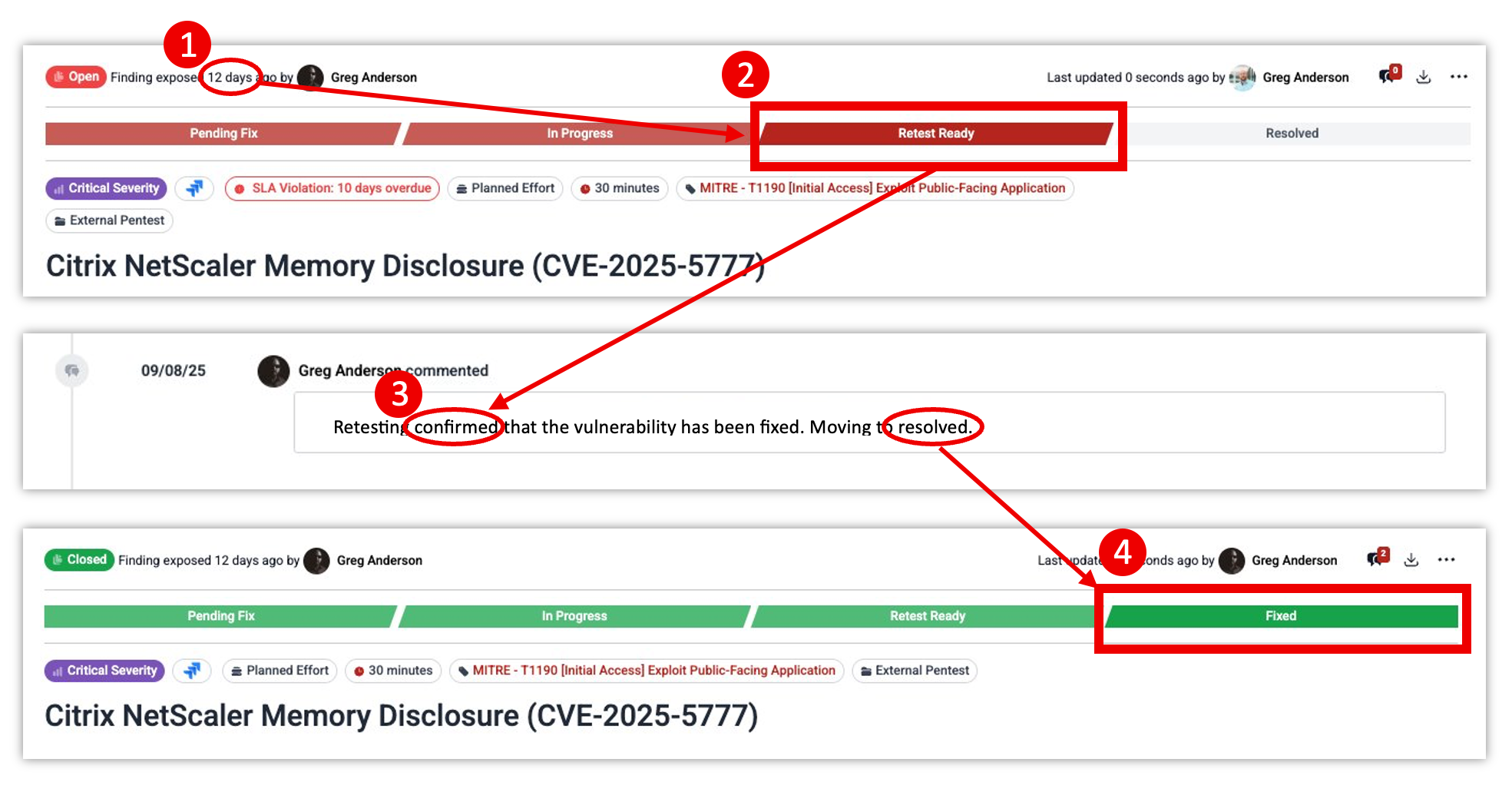
In other words, AI now helps accelerate the middle of the process, the time between identification and confirmation, while Sprocket’s human-led validation guarantees accuracy from start to finish.
Designed for Real Security Work
This feature, and Sprocket’s adoption of AI, in general, is not about buzzwords or marketing trends. It’s about helping practitioners close the operational gap between exposure and assurance faster. By making remediation guidance more precise, accessible, and verifiable, AI Remediation Assistance helps security teams spend less time interpreting findings and more time securing systems.